
DL / RC Mobile Number Update
In this guide, we have covered both the online and offline methods to update your mobile number — separately for your Driving Licence on the Sarathi portal and your Vehicle RC on the Vahan portal.
Why Your Registered Mobile Number Important
Every major transport service today runs on OTP verification. Downloading your RC, paying an e-challan, renewing your driving licence online, receiving e-challan notifications, checking vehicle details on the Vahan portal, or linking documents to DigiLocker and mParivahan — all of these require OTP authentication sent to your registered mobile number.
Two Separate Updates: DL and RC
Something that confuses a lot of people — your driving licence and vehicle registration are managed by two different systems:
- Driving Licence (DL): Managed on the Sarathi portal
- Vehicle RC: Managed on the Vahan portal
Even though both fall under Parivahan, they have separate databases. Updating your mobile number on one does NOT automatically update it on the other.
How to Update Mobile Number in Your Driving Licence (Sarathi Portal)
The Sarathi portal handles everything related to driving licences and learner's licences. Here's the step-by-step process:
What you need for this process:
- Driving Licence number (15–16 digit alphanumeric number on your DL)
- Date of Birth as per your DL
- Aadhaar number
- Access to the mobile number linked to your Aadhaar (for OTP verification)
- Go to sarathi.parivahan.gov.in
- Select your State from the dropdown menu on the homepage
- On the state page, look for the "Others" menu in the top navigation. Click on it and select "Mobile Number Update"
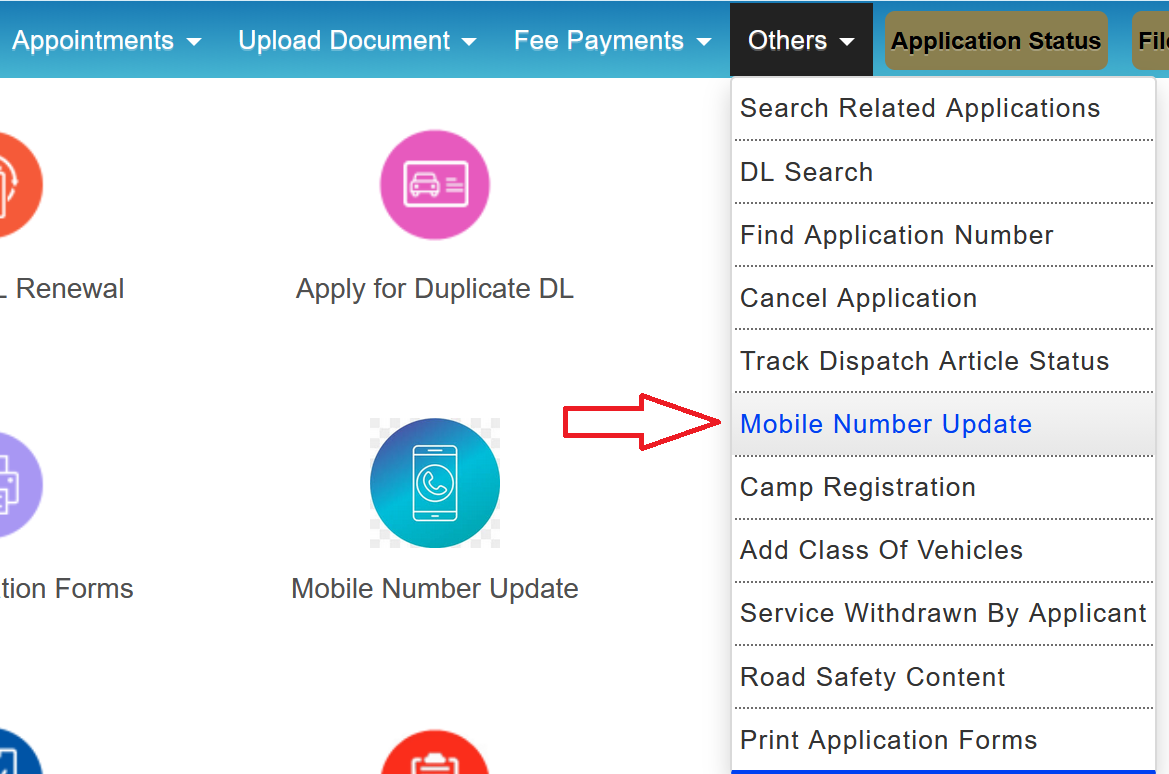
- Enter your Driving Licence Number and Date of Birth as recorded on your DL
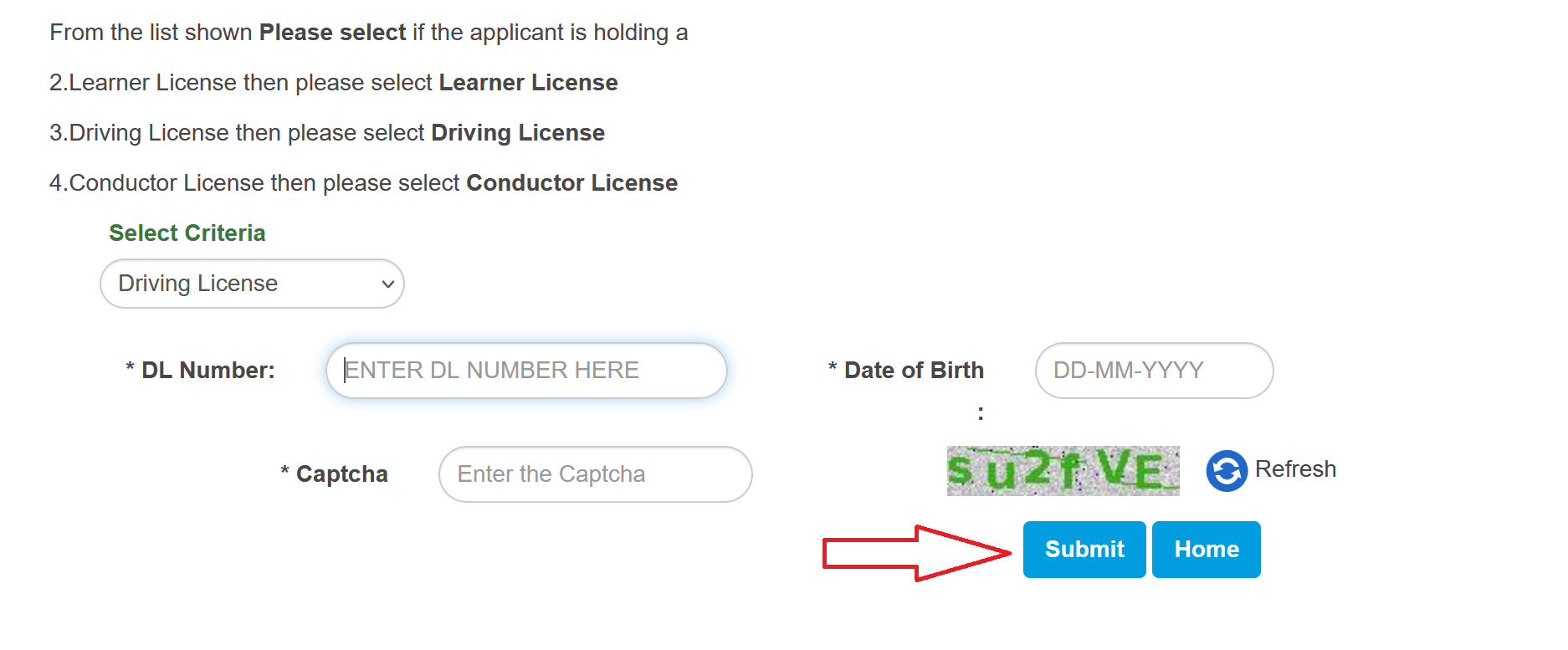
- The system will verify your DL details against the database. If found, it will proceed to the authentication step
- You'll be asked to authenticate through Aadhaar. Enter your Aadhaar number. An OTP will be sent to the mobile number linked to your Aadhaar (not your old DL number, not the new number you want to add, but the number registered with UIDAI against your Aadhaar)
- Enter the Aadhaar OTP
- After successful Aadhaar verification, enter your new mobile number (or confirm the Aadhaar-linked number if that's the one you want on your DL)
- Submit. You'll receive a confirmation message and possibly a reference number. The update is usually instant.
How to Update Mobile Number in Your Vehicle RC (Vahan Portal)
The Vahan portal handles everything related to vehicle registration. The process is similar but uses vehicle details instead of DL details.
What you need for this process:
- Vehicle Registration Number
- Chassis Number (last 5 digits)
- Engine Number (last 5 digits — required in some states)
- Aadhaar number
- Access to the mobile number linked to your Aadhaar (for OTP verification)
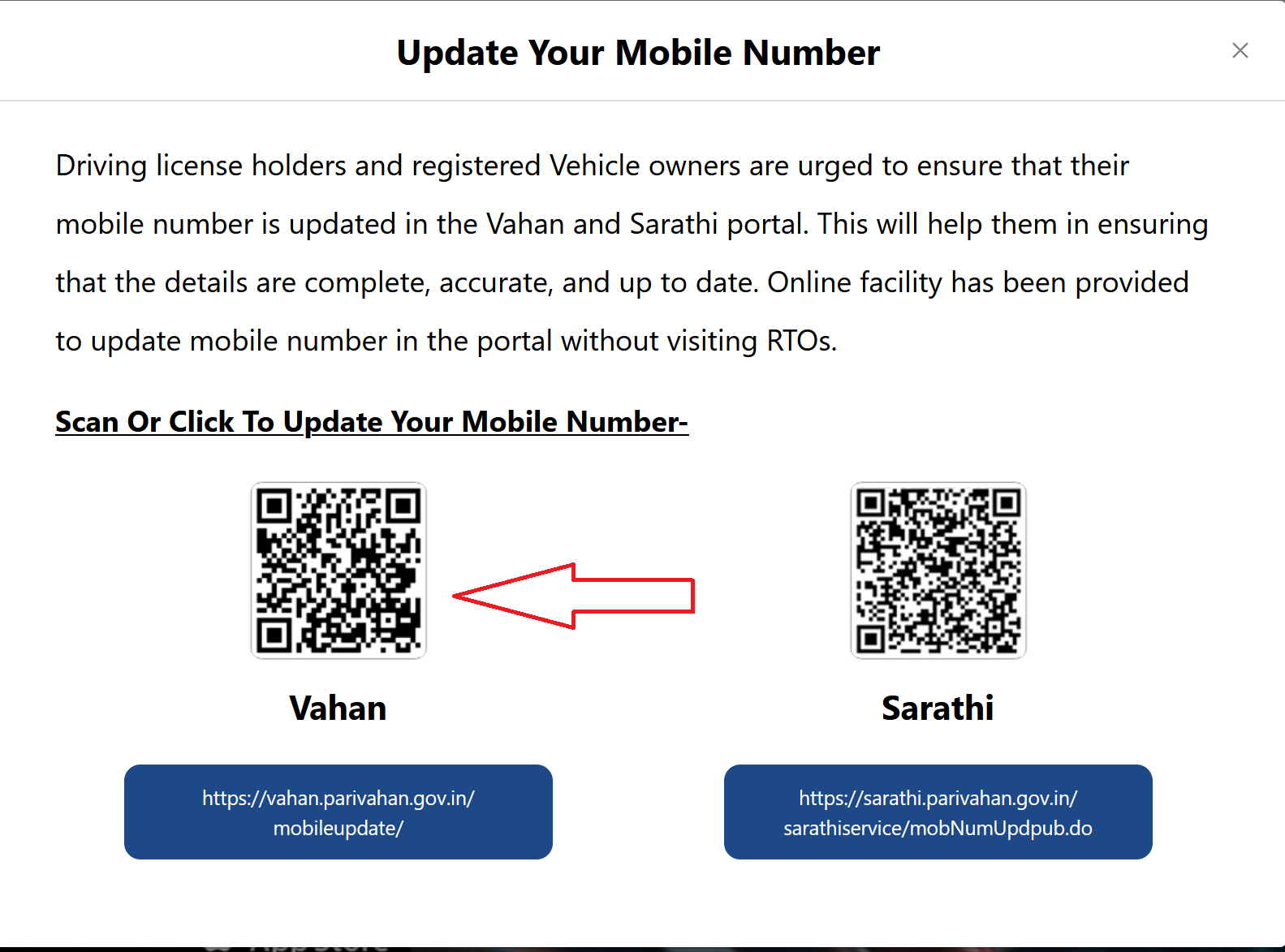
Alternatively, you can reach this through: parivahan.gov.in > Online Services > Vehicle Related Services > Select your State and RTO then proceed.
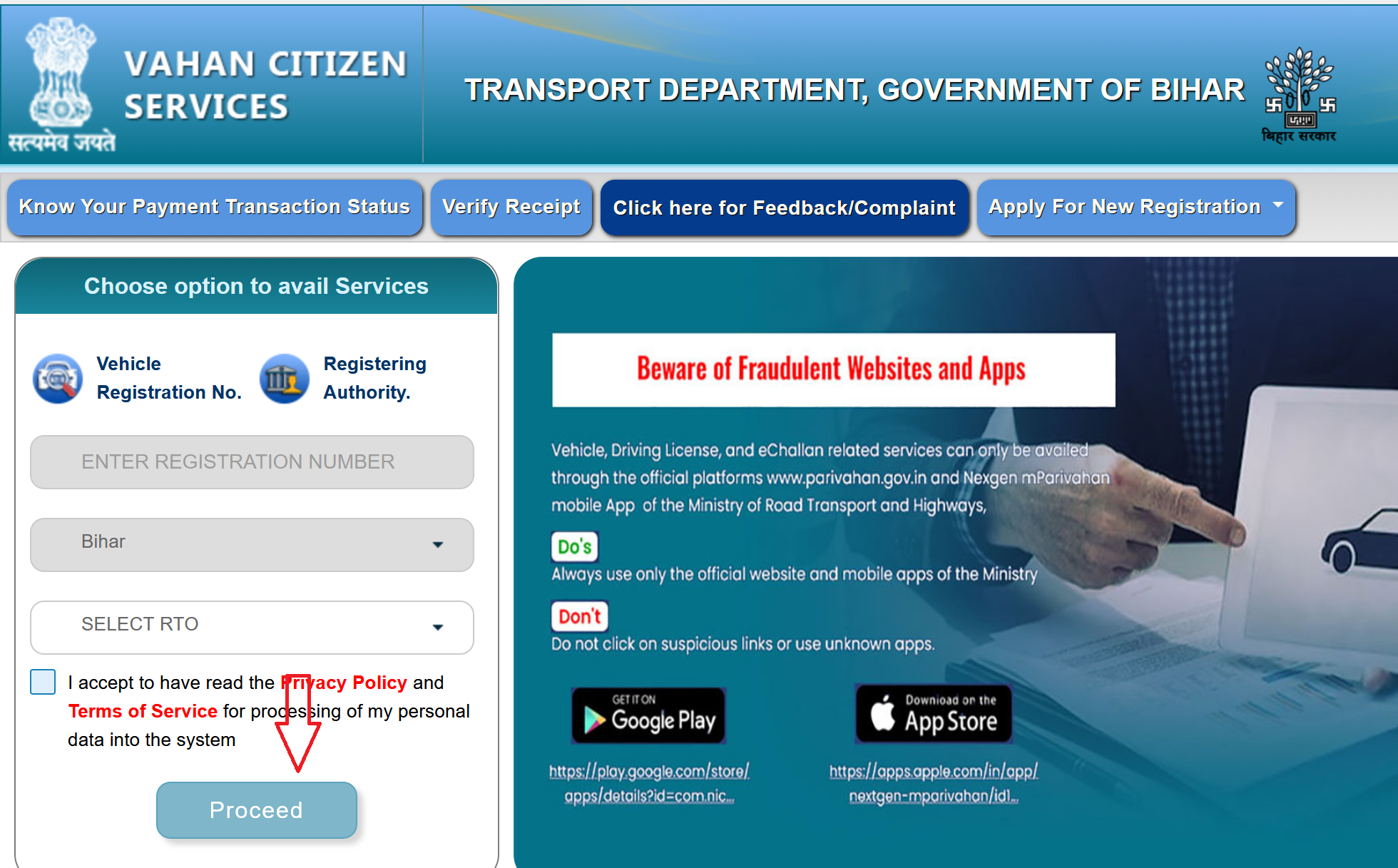
- Look for the "Update Mobile Number" option. On the Vahan portal, this is usually available on the main service page.
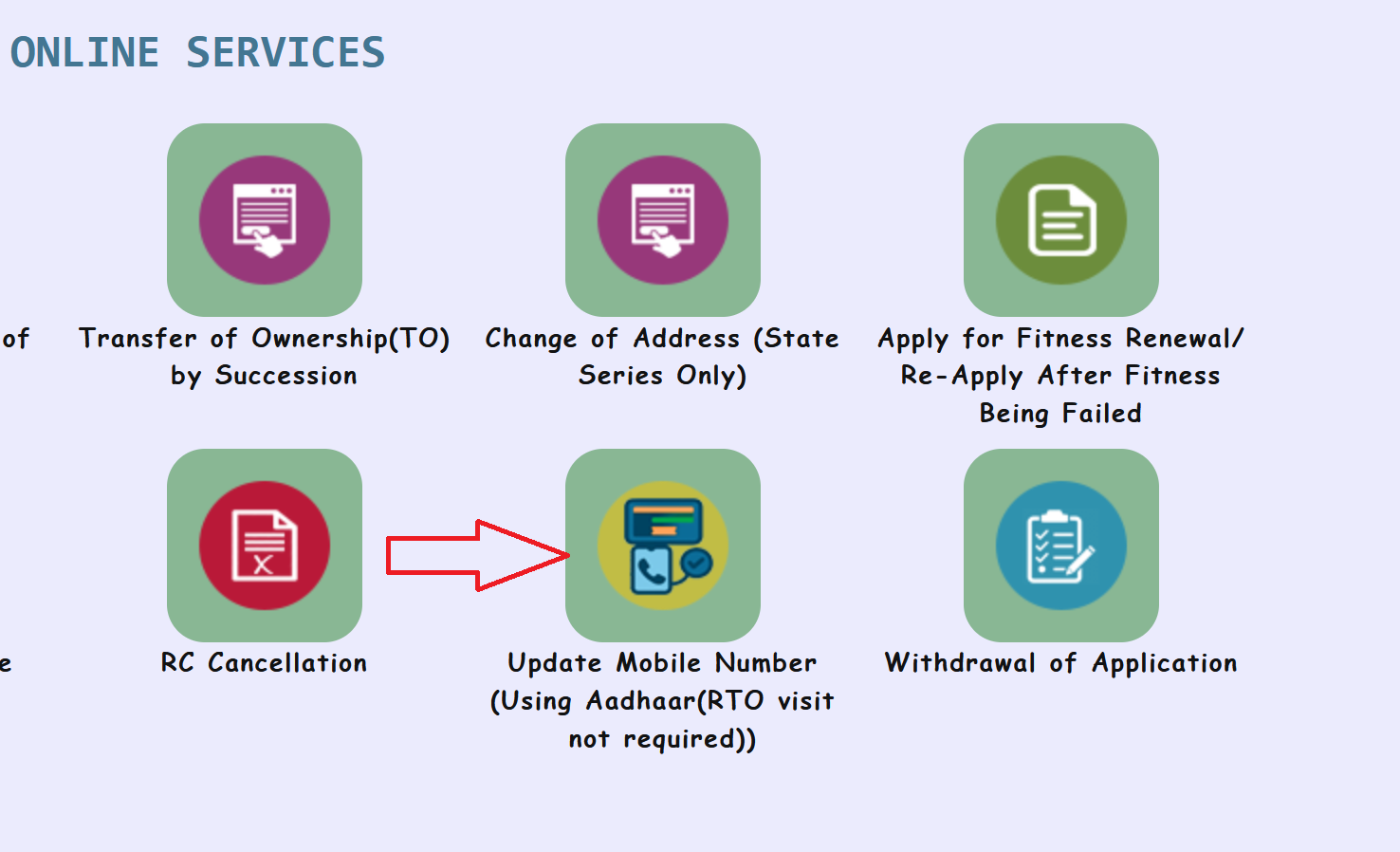
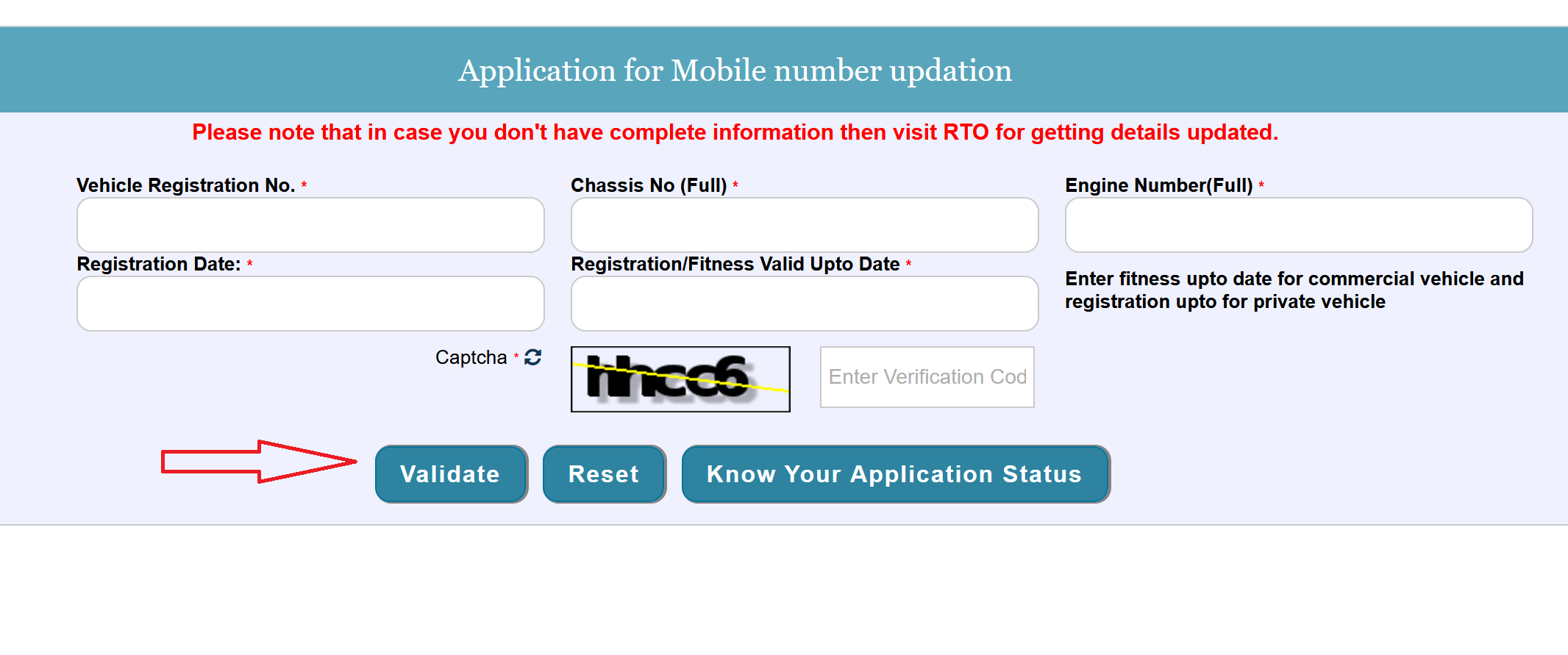
- Enter your Vehicle Registration Number (your number plate, like DL1CAB1234), Engine Number, Registration Date, Fitness and the Chassis Number. Some states also ask for the last 5 digits of the Engine Number.
If you don't know your chassis number, check your physical RC, or the mParivahan app (if you have access to it).
- Click "Validate". The system will pull up your vehicle record.
- Enter your Aadhaar number. Check the consent checkbox. Click "Get OTP." An OTP is sent to your Aadhaar-linked mobile number. Enter the OTP and validate.
- After OTP verification, you may be asked to enter additional vehicle details like registration number, chassis number, engine number, and registration date for confirmation.
- Confirm the Aadhaar-linked number and Submit.
- You'll receive a confirmation message. The update is usually instant, and you'll get an SMS on the new number confirming the change.
What If the Online Process Doesn't Work?
The online update works smoothly for most people, but there are a few scenarios where it fails. Here's what can go wrong and what to do about it:
| Problem | Why It Happens | What to Do |
|---|---|---|
| "Aadhaar Authentication Failed" | Aadhaar not linked to any mobile number, biometric/demographic data mismatch, or UIDAI servers are down | Check your Aadhaar mobile linkage at uidai.gov.in. If everything looks fine, try again later. If it keeps failing, visit the RTO |
| "Vehicle Details Not Found" or "DL Details Not Found" | Older registrations or licences issued before digital migration may not be in the Vahan/Sarathi national database yet | Visit your local RTO with the original document and request data migration to the national database. The online update will work once migrated |
| Vehicle Registered Under a Company Name | Aadhaar-based verification only works for individuals — companies don't have Aadhaar numbers | Visit the RTO in person with the company's authorised signatory, company documents, and a request letter to update the mobile number manually |
Offline Process: Updating Mobile Number at the RTO
If the online process doesn't work for any reason, you can always walk into your RTO and get it done manually. Here's what you need:
For DL mobile number update at the RTO:
- Visit your local RTO with all required documents
- Ask for the mobile number update form at the enquiry or service counter
- Fill in the form with your DL details and new mobile number
- Attach a copy of your Aadhaar card and original DL
- Submit the form and documents to the designated officer
- The officer will verify your details and update the number in the Sarathi system
- You may receive an acknowledgement slip — keep it until the update is confirmed
For RC mobile number update at the RTO:
- Visit your local RTO during working hours with all required documents
- Request the mobile number update form at the enquiry or service counter
- Fill in the form with your vehicle registration details and new mobile number
- Attach your Aadhaar card, address proof, and original RC (smart card or booklet)
- Submit the form and documents to the designated officer
- The officer will verify your details and update the number in the Vahan system
- Processing is usually completed the same day if you visit during working hours
How to Verify That the Update Was Successful
After updating, you should confirm that the new number is actually reflecting in the system. Here's how:
- For DL: Go to sarathi.parivahan.gov.in, select your state, and try accessing any service that requires OTP (like "Print Driving Licence"). If the OTP arrives on your new number, the update is confirmed.
- For RC: Go to vahan.parivahan.gov.in and try any vehicle service that sends an OTP (like "RC Print" or "Know Your Vehicle Details"). If the OTP comes to your new number, it's done.
You can also open the mParivahan app, add your vehicle or DL using the new number, and check if the details load properly.
Special Situations
Multiple vehicles under one owner:
You may need to update the mobile number for each vehicle separately on the Vahan portal. Some states auto-sync all vehicles under the same owner, but don't rely on it. Check each vehicle individually.
Learner's licence (LL):
The mobile number for a learner's licence can also be updated through the same Sarathi portal. The path is the same: Others > Mobile Number Update. Enter your LL application number instead of the DL number.
Vehicle bought from someone else (ownership transfer pending):
If you bought a used vehicle and the RC still shows the previous owner's details, you can't update the mobile number to yours. You need to complete the ownership transfer first through the Vahan portal, and the mobile number will be set during that process.
NRIs:
If you hold an Indian DL or own a vehicle registered in India but your mobile number is a foreign number, the Aadhaar OTP route is the only way since it works with the Aadhaar-linked Indian number. If your Aadhaar is linked to an Indian number that's still active, you can do it remotely. Otherwise, you'll need someone to handle it at the RTO on your behalf with a proper authorization.