
Driving Licence Slot Booking
You cannot appear for the LL or DL test without a confirmed slot booking on the Sarathi Parivahan portal. This guide explains how to book, reschedule, and cancel your test appointment, along with the best time to find open slots and what to carry on test day.
LL computer test & DL driving skill test
→ Book your slotStep-by-step on Sarathi Parivahan
→ Best time to bookWhen RTOs release fresh slots
→ Cancel or rescheduleMax 2 cancellations allowed
→ Test day checklistDocuments & things to carry
→ What happens at the testLL computer test & DL driving test format
Two Tests, Two Slot Bookings
Getting a driving licence in India involves two separate tests, and each requires its own slot booking.
Learner's Licence (LL) Test:
This is a computer-based test on traffic rules, road signs, and basic road safety. It's the first step. You apply for a learner's licence, pay the fee, and then book a slot to take this test. This test can now be taken online from home through Aadhaar-based authentication (called the faceless or contactless LL service).
The LL test has 20 multiple choice questions. You get about 30 to 60 seconds per question depending on the state. You need to score at least 60% (12 out of 20) to pass. Languages available include Hindi, English, and regional languages.
Driving Licence (DL) Skill Test:
This is the actual driving test. After you get your learner's licence, you wait at least 30 days (mandatory practice period), and then apply for the permanent DL. You book a slot for the driving skill test, show up at the RTO with a vehicle, and the Motor Vehicle Inspector evaluates your driving on the test track. This one always requires a physical visit.
How to Book Your LL / DL Test Slot
The process for booking both the Learner's Licence test slot and the Driving Licence skill test slot is almost identical. The only difference is which option you select in Step 3. Here's how it works:
- Go to sarathi.parivahan.gov.in and select your state
- Click on "Appointments" in the menu
- Select "Slot Booking" and then choose the test you need:
- If you want to book for the Learner's Licence computer test, select "LL Test Slot Booking"
- If you want to book for the Driving Licence skill test, select "DL Test Slot Booking"
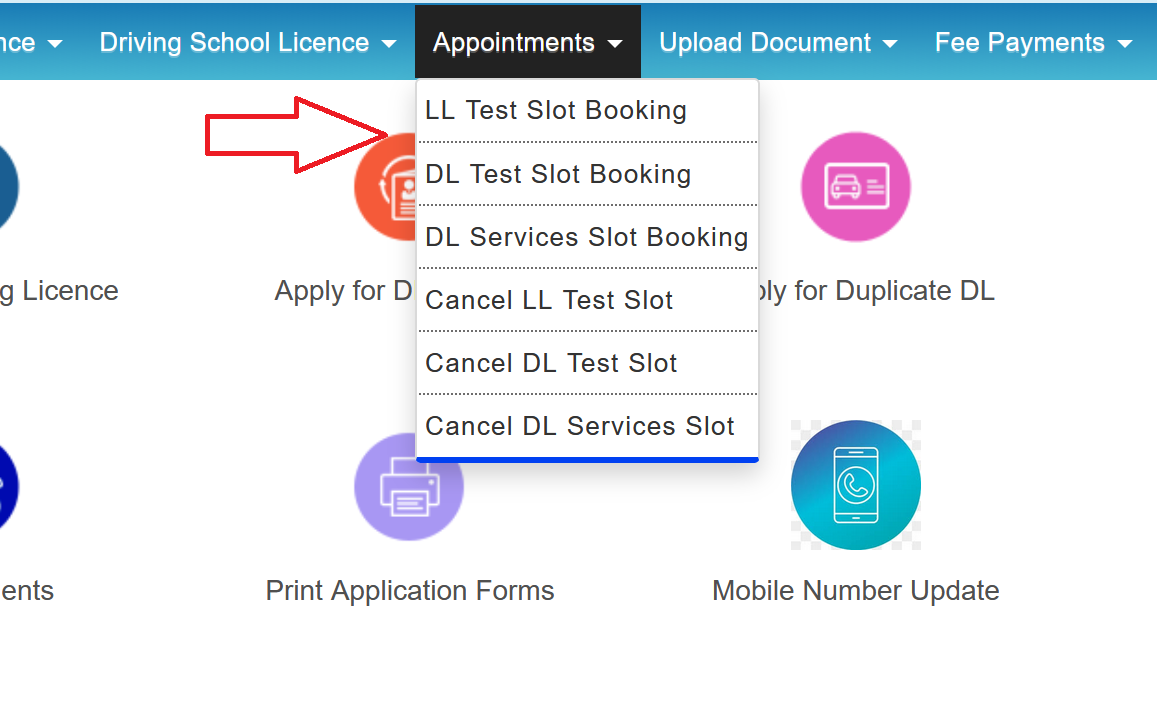
- Enter your details:
- For LL test: Enter your Application Number and Date of Birth
- For DL test: You'll see two options - enter either your Application Number or your Learner's Licence Number, along with your Date of Birth
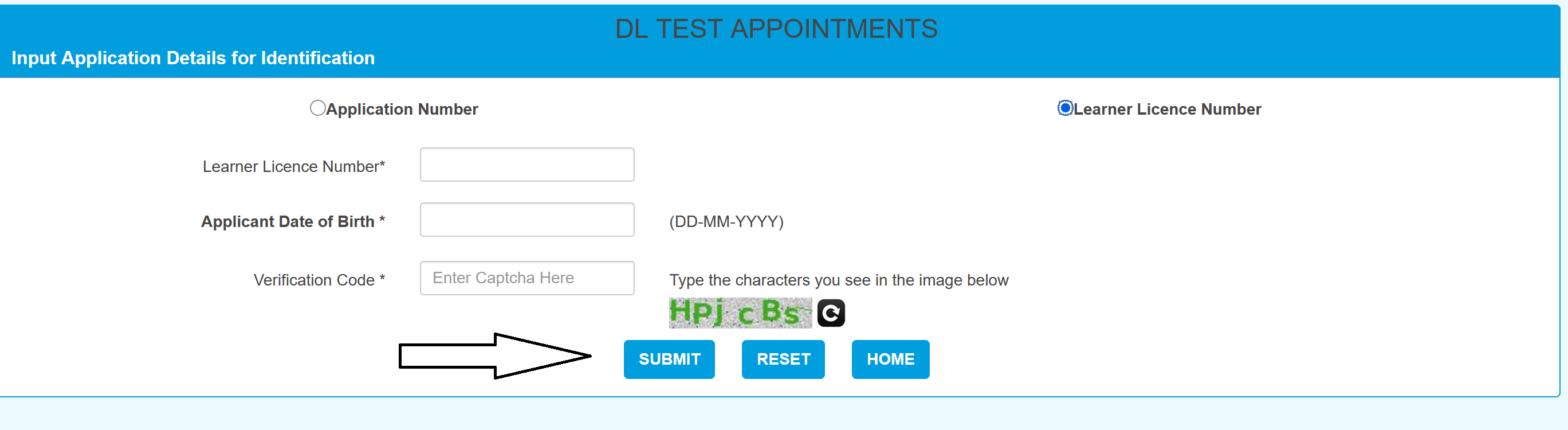
Complete the captcha/verification code and click "Submit". The system will verify your application details.
- Select the class of vehicle you're applying for. For example, MCWOG for gearless two-wheeler, MCWG for geared two-wheeler, or LMV for car. If you're booking a DL skill test and applying for both two-wheeler and four-wheeler, check both boxes. This lets you take both tests on the same day at the RTO, saving you a second visit.
- Click "Proceed to Book". The calendar will appear showing available dates. Green dates have slots available, Red means full or unavailable, and Blue usually means a holiday. Click on a green date.
- Select a time batch from the available options (for example, 10:00 AM to 12:00 PM, or 2:00 PM to 4:00 PM)
- Click "Book Slot" or "Confirm"
- An OTP will be sent to your registered mobile number. Enter it to confirm the booking.
- Download and print the appointment slip. This is mandatory. You will not be allowed entry at the RTO without this printed slip. Keep it safe.
Important Note for LL applicants - faceless/online test option:
- In several states, you don't need to book a slot at the RTO for the LL test at all. After paying the fee and getting your application approved (usually instant with Aadhaar authentication), you can take the LL test immediately online from home.
- The test happens right there on the Sarathi portal. You'll be shown a short instructional video, and then the 20-question MCQ test begins. If you pass, your learner's licence is issued digitally. If you fail, you can try again after a waiting period (usually 7 days).
- Check whether your state supports the faceless LL test by looking for the option during or after your LL application on the Sarathi portal.
When Do Slots Get Released?
- Most RTOs release fresh slots either early morning between 7 AM and 10 AM or around midnight. Some states refresh the system daily, while others release slots for the entire week on a specific day. There is no fixed schedule. It varies by state and RTO.
- Each RTO has a daily cap on the number of applicants it can test, typically between 50 and 100 slots per day depending on capacity and the number of testing lanes available. Once the daily quota is filled, the calendar date turns red and no further bookings are accepted.
- Slots at popular RTOs in metro cities such as Delhi, Mumbai, Bangalore, Hyderabad, and Chennai tend to fill up the fastest, often within 5 to 10 minutes of release. Smaller RTOs in district towns generally have more availability.
Tips for grabbing a slot:
- Log in to the portal 5 to 10 minutes before the expected release time
- Use a desktop/laptop with a stable internet connection (the portal works better on desktop than mobile)
- Have your application number and date of birth ready
- Click fast when green dates appear, and don't refresh the page unnecessarily
How to Cancel Your Slot
If you want to cancel entirely, here's the process:
- Go to sarathi.parivahan.gov.in and select your state
- Click on "Appointments"
- Select "Cancel LL Test Slot" or "Cancel DL Test Slot"
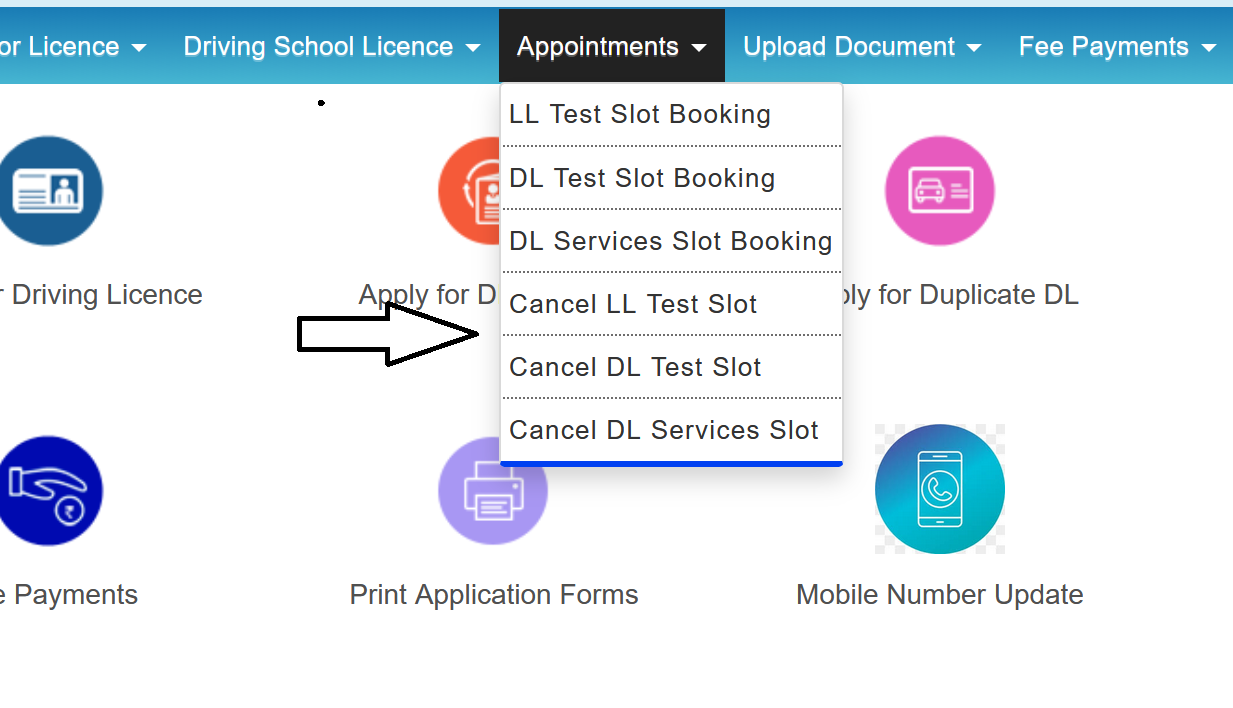
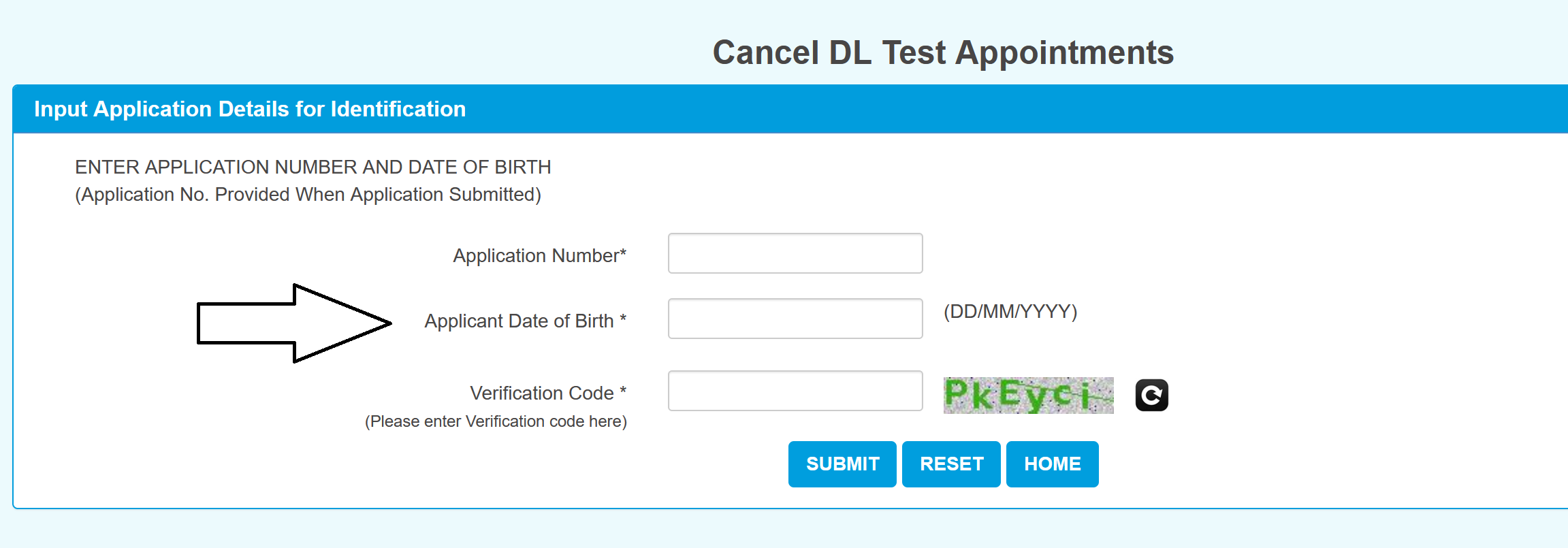
- Enter your Application Number, Date of Birth, and verification code
- Your appointment details will appear. Click "Cancel"
- You'll receive an on-screen confirmation and an SMS
Reschedule After Cancellation
After cancellation, you need to go through the slot booking process again from scratch, subject to slot availability. The test fee may or may not be refunded after cancellation depending on your state's policy.
What to Carry on Test Day
For LL Test at the RTO:
- Printed appointment slip (downloaded from the portal)
- Original Aadhaar card or any government-issued ID proof
- Application acknowledgement with fee receipt
- One passport-sized photograph (some RTOs ask for it)
For DL Skill Test:
- Printed appointment slip
- Original Learner's Licence (valid and not expired)
- DL application acknowledgement with fee receipt
- Original Aadhaar card or ID proof
- The vehicle you'll be tested on (it must be in roadworthy condition with valid insurance and registration). If it's not your own vehicle, carry the owner's authorization. For two-wheeler tests, bring a helmet. For four-wheeler tests, wear a seatbelt during the test.
- DL test fee receipt (if paid separately from the application fee)
What Happens During the Tests
LL Computer Test (at RTO):
- You are seated at a computer terminal and given 20 multiple-choice questions on traffic signs, road markings, rules of the road, and basic safety.
- Each question has a fixed time limit. Results are displayed immediately after submission.
- A score of 60% or above (12 out of 20) is required to pass. If you pass, the learner's licence is approved and issued.
- If you fail, you can rebook for a retest after a 7-day waiting period. The retest fee applies.
DL Skill Test:
- The test is conducted on a designated driving test track at the RTO. Many major cities now use Automated Driving Test Tracks (ADTT) equipped with sensors, cameras, and path markers to evaluate driving without manual examiner bias.
- For two-wheelers, the standard track includes a figure-8 and a zigzag course.
- For four-wheelers, the track typically includes an H-track or T-track, gradient (slope) driving, and parallel parking.
- Other manoeuvres may include stopping at designated points, reverse parking, traffic signal response, and lane discipline.
- If you pass, the permanent DL is approved and dispatched to your registered address within 7 to 30 days.
- If you fail, you can rebook after the waiting period. There is no limit on the number of attempts as long as the learner's licence remains valid (6 months from the date of issue).
Let me research common issues people face with the Parivahan slot booking system.Good research. I've got a clear picture of the most common issues. Here's the section:
Common Errors and How to Fix Them
"No Slots Available" or "Quota Full"
It means the daily slot limit for your RTO has been reached. Try logging in during off-peak hours (early morning between 6 AM and 8 AM or late night after 10 PM), when fresh slots are typically released. Also check different dates across the next 30 days rather than a single preferred date. Cancelled slots reappear in the system, so checking repeatedly can help.
"Due to some technical issue, slot booking not allowed"
This usually indicates a server-side problem, not an issue with your application. Clear your browser cache, try a different browser (Firefox tends to work better with this portal), or switch to incognito mode. If the problem persists, try again during off-peak hours.
"Slots are not defined, please contact RTO"
This means no slots have been released for the selected date or RTO. It does not mean your application has an issue. Wait for the next slot release cycle or contact your RTO directly to confirm when new slots will be available.
"Application number is approved but slot booking not allowed"
This typically happens when you enter the wrong application number. If you applied for a permanent DL, make sure you are entering the DL application number and not the old LL application number. You can check this under Application Status on the Sarathi portal.
Blank page after submitting application number and date of birth.
This is a browser or server issue. Refresh the page, clear cache and cookies, or try from a different device. Avoid using VPN or proxy connections as they can interfere with the portal.
Payment deducted but booking not confirmed.
Do not retry the payment immediately. Check your bank statement and note the transaction ID. If the amount was debited but no confirmation was generated, raise a dispute with your bank and contact the RTO with screenshots of the failed transaction. Refunds are usually processed within 7 to 15 working days depending on the payment gateway.
LL expiring and no slots available.
If your learner's licence is about to expire and no online slots are showing, visit your RTO in person with all original documents. Some RTOs allow walk-in slot assignment or manual booking through their counter system. Carry a printout of the "no slots available" screen as supporting evidence.