
Driving Licence Status Check
Step 1: Visit the Sarathi Parivahan Portal · Step 2: Select Your State · Step 3: Click on "Application Status" · Step 4: Enter Your Application Number and Date of Birth · Step 5: Complete the Captcha and Click Submit · Step 6: View Your Current DL Application Status
Step-by-step via Parivahan & mParivahan app
→ Recover application no.What to do if you've lost or forgotten it
→ Status meaningsWhat each update actually means for you
Things to keep ready before checking your DL status
| Requirement | Why it's needed |
|---|---|
| Application Number | This is the primary identifier for tracking your DL application on the Sarathi Parivahan portal. You receive it after submitting your application at the RTO. It's usually printed on your acknowledgement slip |
| Date of Birth | Used for verification on the Parivahan portal. Must match the date of birth you provided during your DL application — even a minor mismatch will return no results |
| Driving Licence Number | Needed only if your DL has already been issued and you want to check its current status or validity. This is the alphanumeric number starting with your state code (e.g., UP14, DL05, MH02) |
| Stable Internet Connection | The Parivahan and mParivahan portals can be slow during peak hours. A stable connection avoids timeouts and incomplete page loads |
Check Status on the Sarathi Parivahan Portal
This is the official and most reliable way to track your driving licence application status.
Here's how to do it:
- Open sarathi.parivahan.gov.in in your browser.
- Select the state where you submitted your application. This is important because each state has its own Sarathi portal, and your records only show up on the correct one.
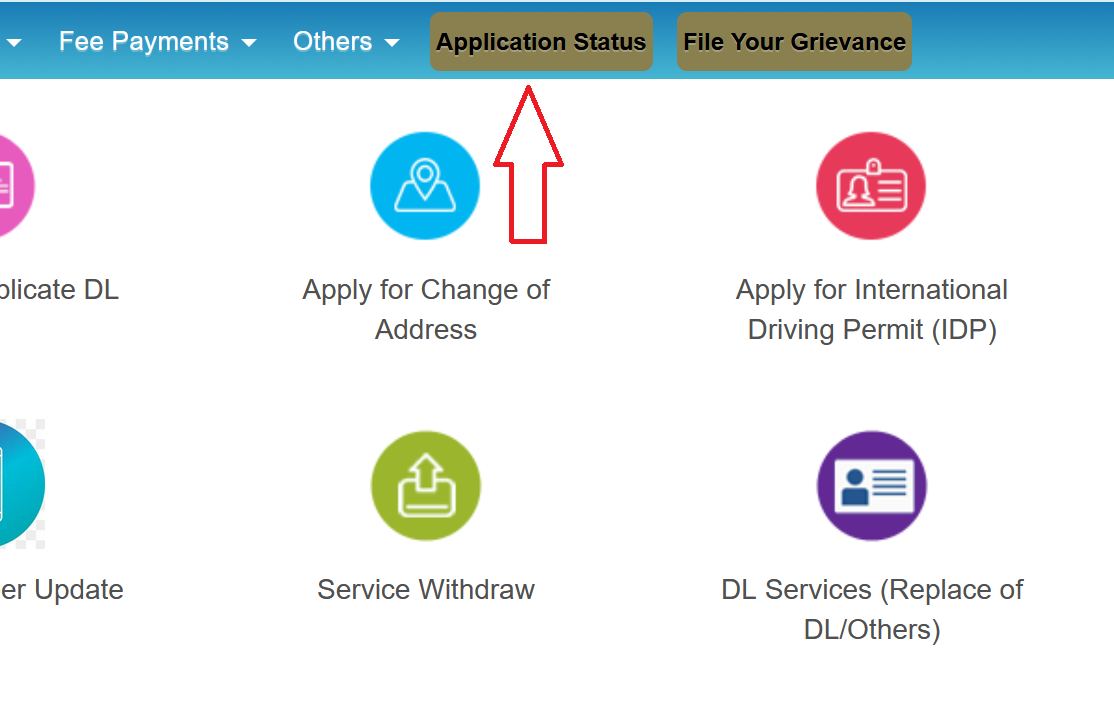
- Look for the "Application Status" option. Depending on your state, this might be under the "Driving Licence" menu, the "Others" menu, or directly on the homepage. The layout varies a bit from state to state.
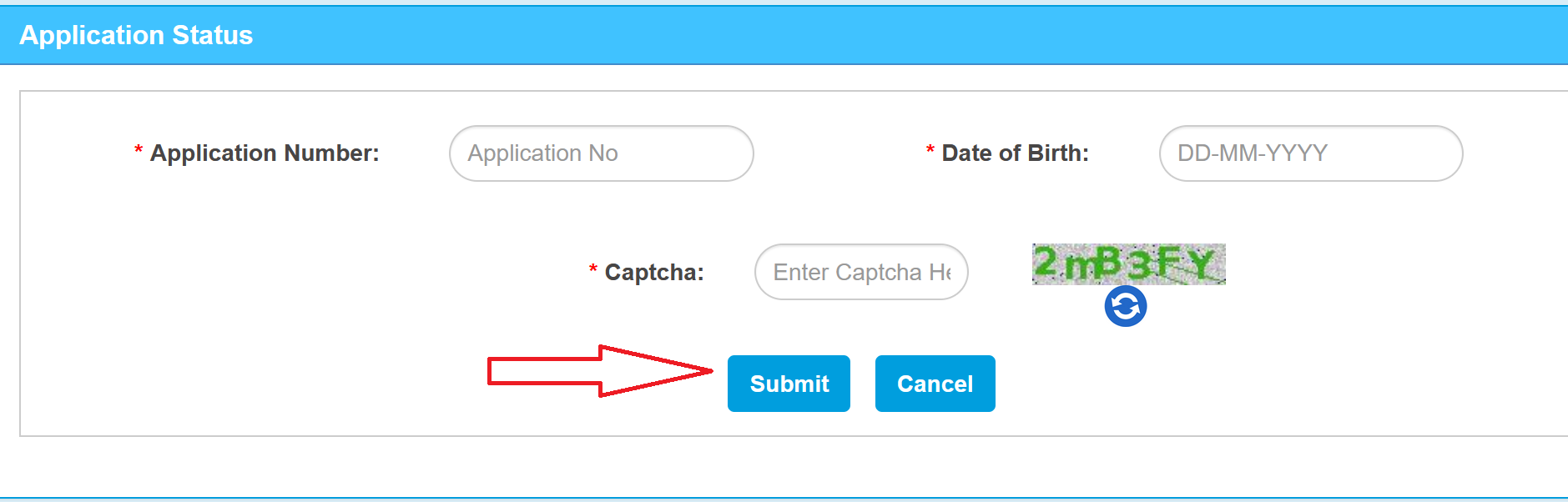
- Enter your Application Number. This is the number you received when you first submitted your DL application at the RTO or online.
- Enter your date of birth and solve the captcha.
- Click "Submit" and your current application status will show up on screen.
Status Messages Explained
| Status | What it means |
|---|---|
| Under Process / Pending at RTO | Your application is still being reviewed, or it is awaiting your test or appointment date. No action is required at this stage |
| Scrutiny Completed | The RTO has reviewed your uploaded documents and found them in order. You are cleared to proceed to the next step |
| Rejected | Your application was not approved. The portal usually mentions a specific reason. Common causes include mismatched information (e.g., name on the application differs from Aadhaar), poor quality photographs, incomplete documents, or failed address verification |
| Driving Test Pass | You have cleared the driving test. Your DL approval is now in progress |
| DL Approved | The licensing authority has given final approval. Your licence is now moving to the printing stage |
| Licence Printed | The physical smart card has been printed and is being prepared for dispatch |
| Dispatched | Your licence has been sent via India Post (speed post). Delivery typically takes 5 to 15 days depending on your location |
Retrieve Your Lost Application Number
Losing or misplacing your application number is one of the most common issues applicants face. Whether the acknowledgement slip was discarded, stored somewhere inaccessible, or never noted down, recovering it is still possible through the following methods.
Option 1: Search on the Sarathi Portal
- Go to sarathi.parivahan.gov.in and select your state.
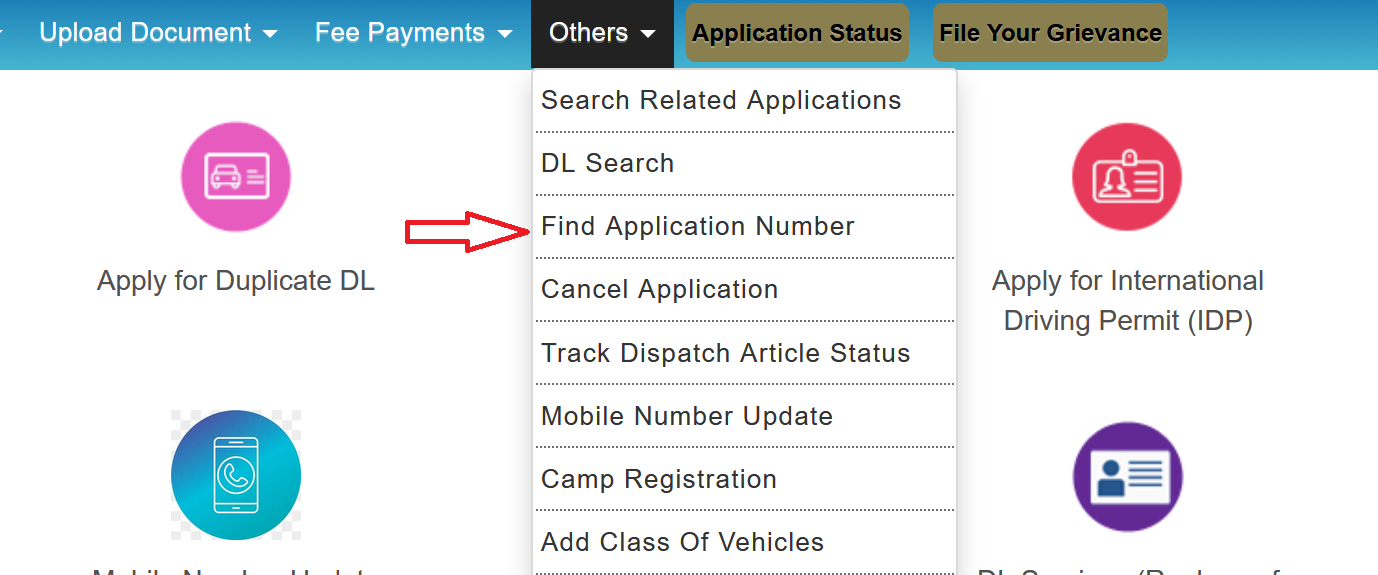
- Look under the "Others" menu (sometimes it's under "Driving Licence" depending on the state).
- You should see an option like "Find Application Number", "Search Related Application", or "DL Search." The exact wording changes from state to state.
- Select State, RTO, then enter whatever details you do remember. This usually includes your name, date of birth, and registered mobile number. Some states also ask for your father's name or address.
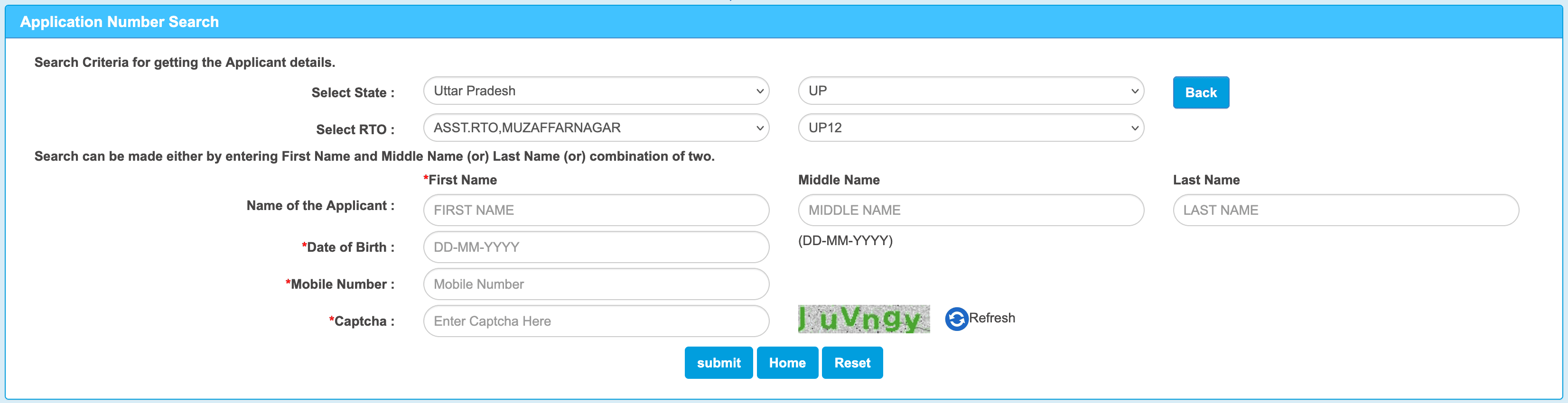
- Click Submit and the system will pull up applications matching your details, along with the application number.
Option 2: Check your email or SMS history
The Sarathi portal sends a confirmation to your registered email and phone number upon submission. Search your inbox using keywords like "Sarathi," "Parivahan," or "DL application." Check your SMS history as well, though older messages may have been deleted. Emails are generally more reliable for older applications.
Option 3: Check your payment receipt
If you paid the application fees online, the payment receipt or transaction confirmation often includes the application number or a reference number the RTO can use to trace your application. Open your UPI app (Google Pay, PhonePe, Paytm, etc.) and search for transactions with merchant names like "Sarathi," "Parivahan," or your state transport department.
Option 4: Visit or call the RTO
If none of the above methods work, visit the RTO where you submitted your application. Carry your Aadhaar card and any documents you provided during the application process. The office can look up your records and share the application number.
Driving Licence Processing Time
This varies by state, but here's a rough idea of what to expect:
| DL type | Estimated processing time |
|---|---|
| Learner's Licence | 1 to 7 days after passing the online test. Some states issue it on the same day |
| Permanent DL (after driving test) | 2 to 4 weeks after passing the test. Some states process it within a week, while others may take up to 6 weeks |
| DL Renewal | 1 to 3 weeks in most states. Online applications are typically processed faster |
| Duplicate DL | 1 to 2 weeks |
| International Driving Permit | 1 to 2 weeks |
If your application has been stuck at any stage for longer than these timeframes, it's a good idea to follow up. Either call the helpdesk or visit the RTO.
Helpdesk Contact
- Email: helpdesk-sarathi@gov.in (replies usually within 2 to 3 working days)
- Phone: +91-120-4925505 (available 6 AM to 12 PM, all days)