
Parivahan Sewa - Sarathi, Vahan, eChallan
Parivahan Sewa brings together three portals (Sarathi, Vahan, and eChallan) for all transport-related services in India. This guide covers what each portal offers, how to use them, and which one you need.
Portal structure and services
Parivahan Sewa is not a single website. It is divided into multiple portals, each handling a specific category of transport services. Understanding which portal to use helps avoid unnecessary confusion.
- Sarathi (sarathi.parivahan.gov.in)
- Vahan (vahan.parivahan.gov.in)
- eChallan (echallan.parivahan.gov.in)
Sarathi Parivahan Services (Sarathi Portal)
The Sarathi portal (sarathi.parivahan.gov.in) handles all driving licence-related services in India. From applying for a new licence to renewing an expired one, every service is accessible online through your state-specific Sarathi dashboard. Below is a complete list of services available on the portal.
| Service | What it covers |
|---|---|
| Apply for Learner's Licence | New LL application, document upload, fee payment, and LL test slot booking |
| Apply for Driving Licence | Permanent DL application after holding a valid LL for at least 30 days, driving test slot booking |
| DL Renewal | Renewal of expired or soon-to-expire driving licences. Can be done up to one year before or after expiry |
| Duplicate DL | Replacement for a lost, stolen, or damaged driving licence |
| Add Vehicle Class | Adding a new vehicle category (e.g., adding LMV to an existing two-wheeler licence) |
| Change of Address | Updating the address on your existing driving licence |
| Change of Name | Updating your name on the driving licence after a legal name change |
| International Driving Permit (IDP) | Application for an IDP required for driving abroad. Valid for one year |
| DL Extract | Obtaining a certified copy or extract of your driving licence record |
| Replacement of DL | Replacing a physically damaged smart card or updating a photo on the licence |
| Conductor Licence | Application and renewal of conductor licences for public transport vehicles |
| Online LL Test | Taking the learner's licence theory test online (available in states that support Aadhaar-based authentication) |
| Appointment Booking | Scheduling or modifying appointments for LL tests, driving tests, or RTO visits |
| Application Status | Tracking the status of any pending LL or DL application |
| DL Download / Print | Downloading or printing your learner's licence or driving licence from the portal |
| Fee Payment | Online payment for any Sarathi service via UPI, net banking, or card |
| Driving School Licence | Application for registering or renewing a driving school licence |
Apply for Learner's Licence
- Go to sarathi.parivahan.gov.in.
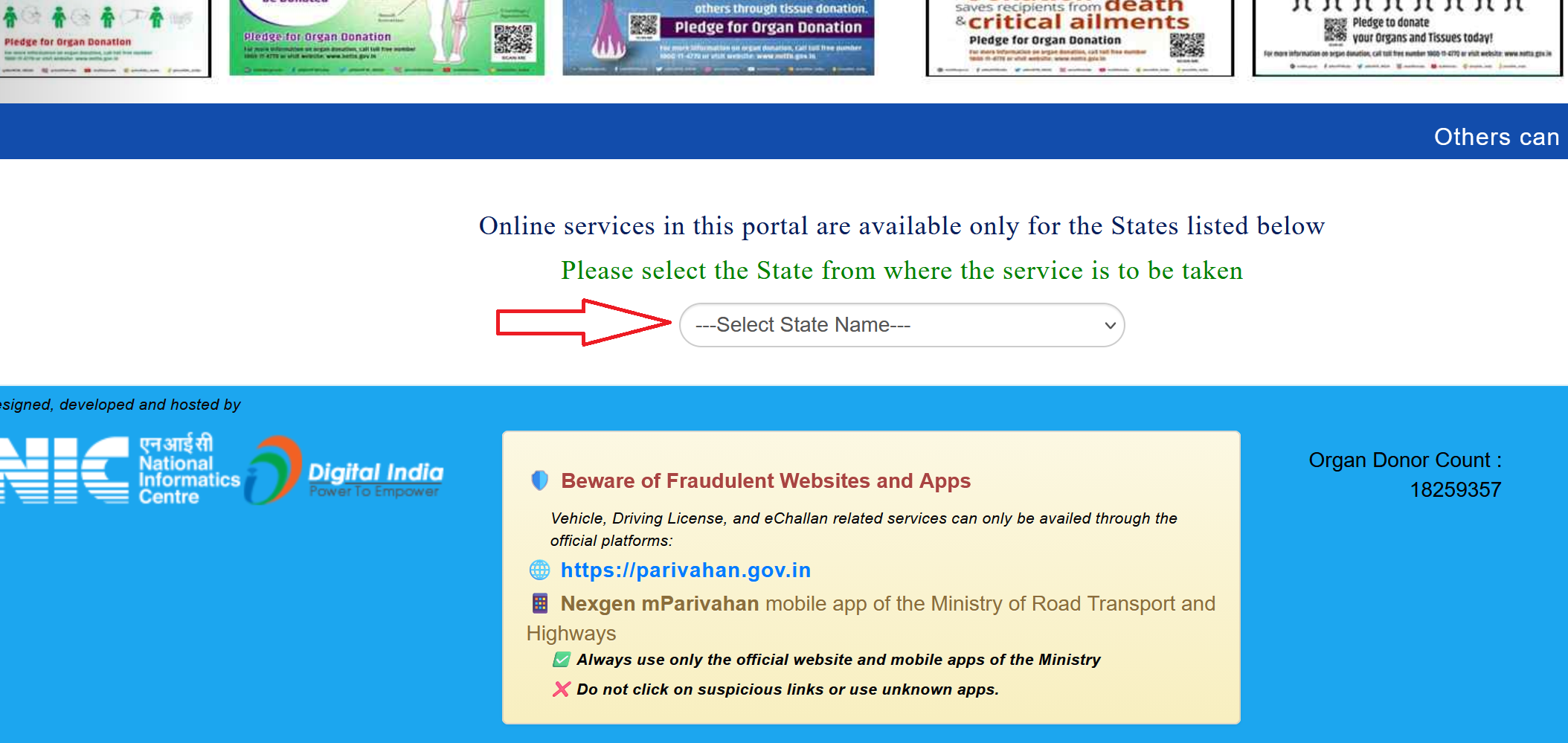
- Select your state from the dropdown.
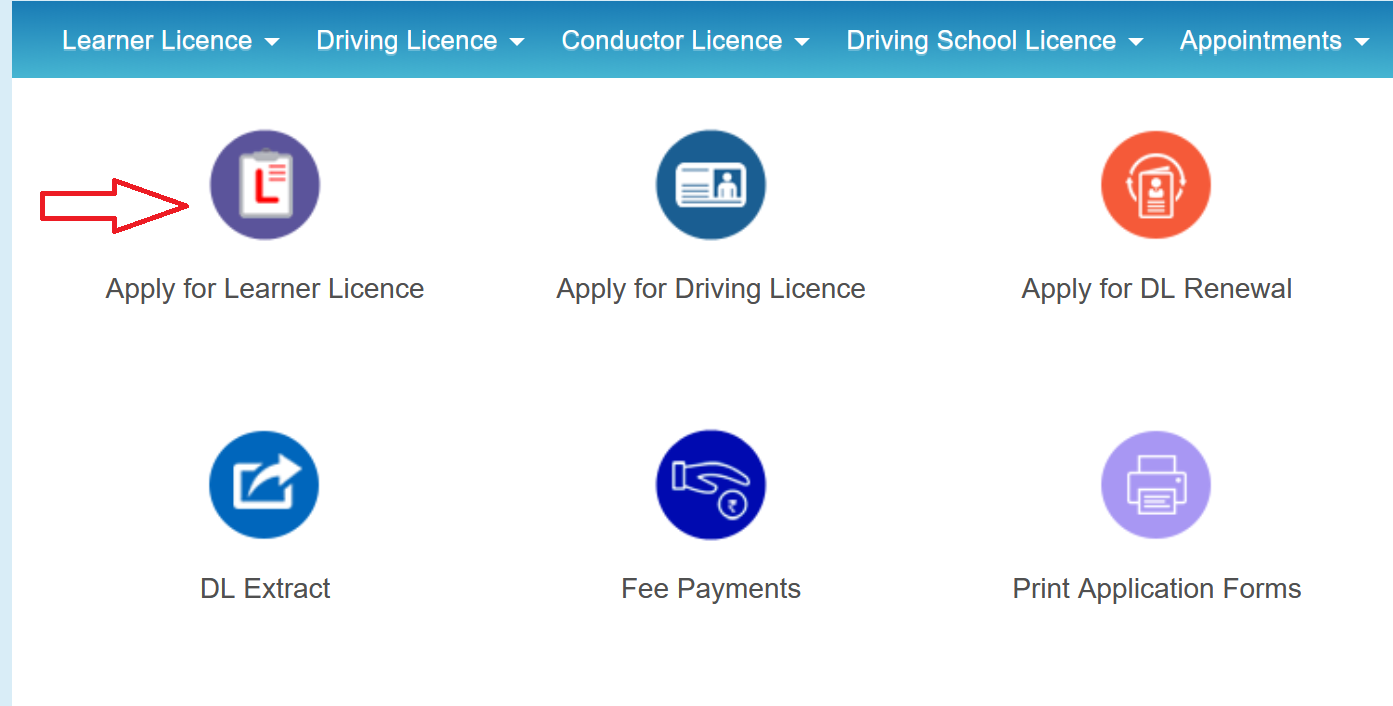
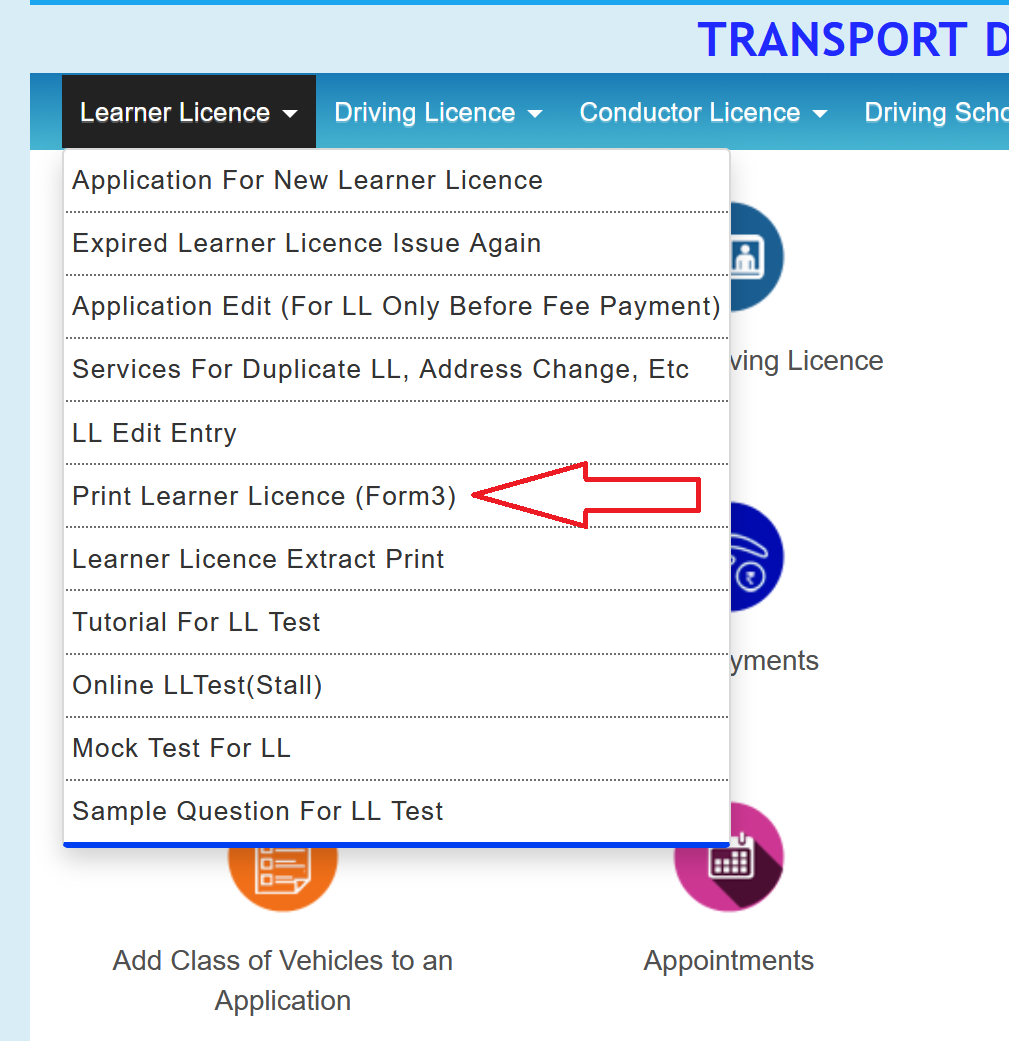
- On the Sarathi dashboard, click Learner's Licence, then Apply for New Learner's Licence.
- Read through the instructions page and click Continue.
- Now select your category (for example, General).
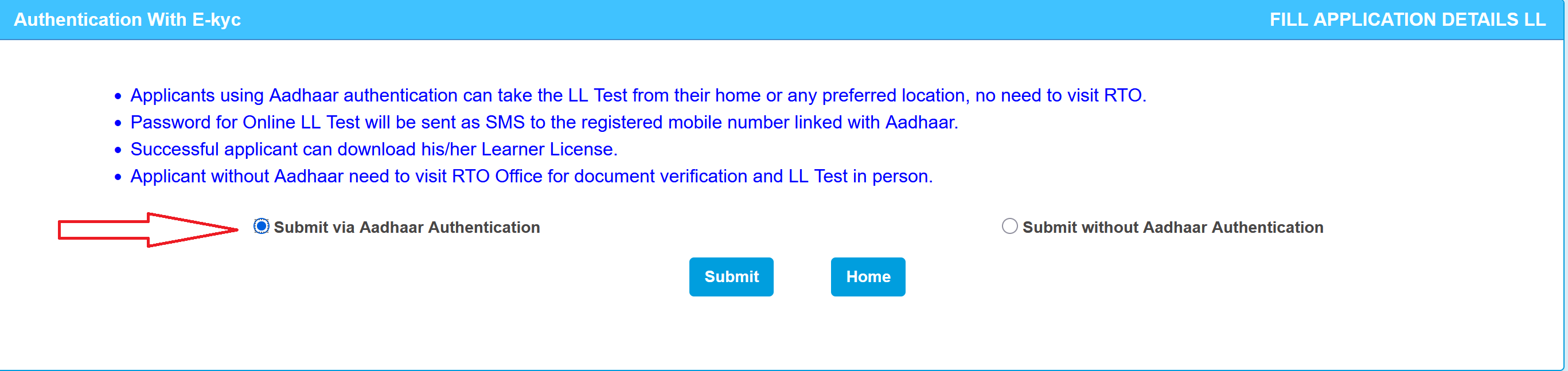
- After that, the portal gives you two options: Submit via Aadhaar Authentication or Submit without Aadhaar Authentication.
- Fill in the application form (in case of without Aadhaar Authentication): Mobile Number, name, father's/mother's name, date of birth, address, and most importantly, the vehicle class you want. For example, if you want to ride a bike and drive a car, select both "MC With Gear" and "LMV".
- Upload your documents in the specified format.
- Book a slot for your LL test. In most states, this is a computer-based test at the RTO. Some states have started allowing you to take it fully online from home, though this varies.
- Pay the fee online. LL fee is ₹200.
- On the test date, show up at the RTO with your original documents and the payment receipt.
Apply for Permanent Driving Licence
After your LL is at least 30 days old, you can apply for the permanent licence.
- Go to sarathi.parivahan.gov.in and select your state.
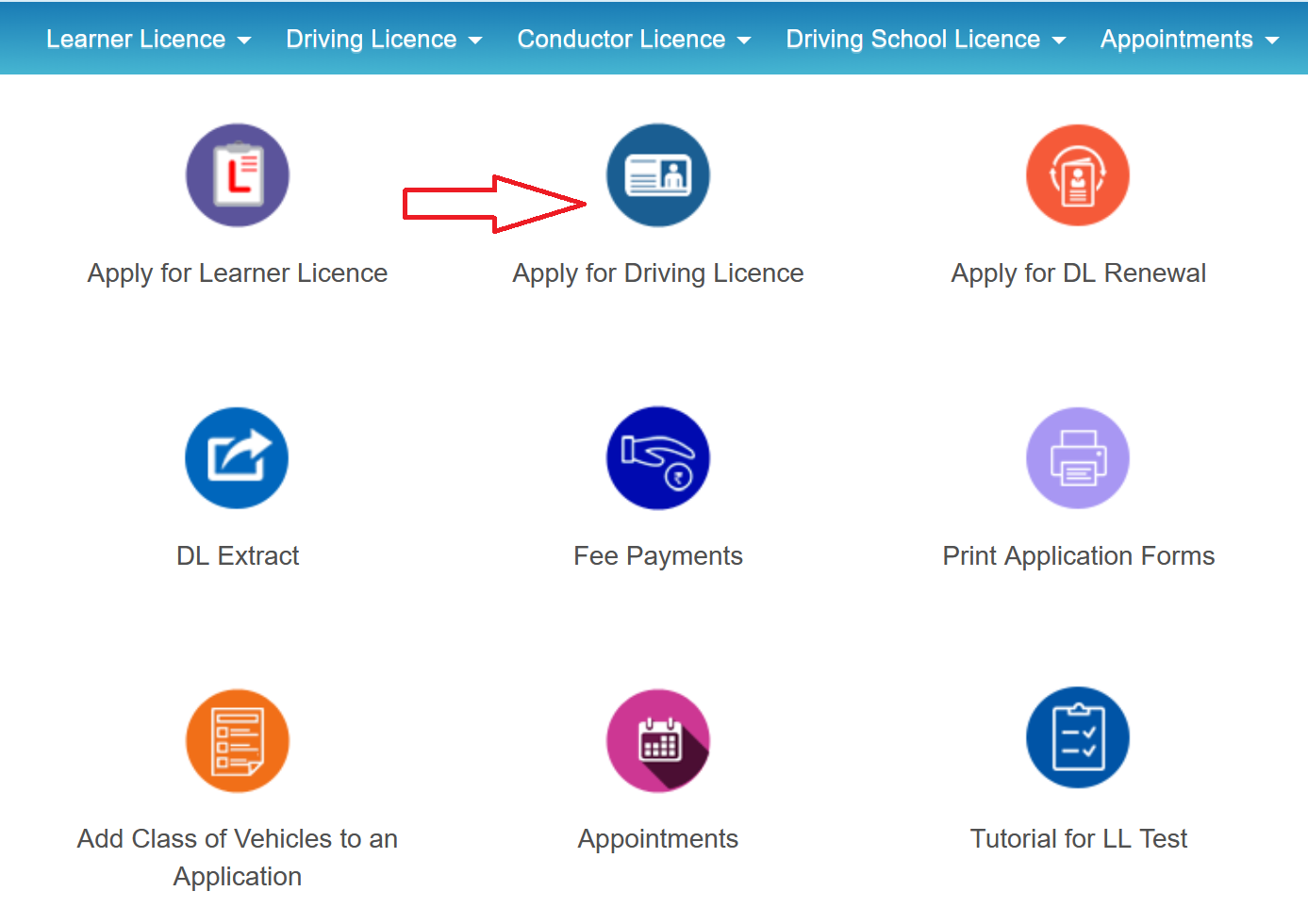
- On the dashboard click Apply for Driving Licence.
- Enter your LL number and date of birth. The system will pull up your existing application.
- Fill out the application form (Form 4) and upload any additional documents if asked.
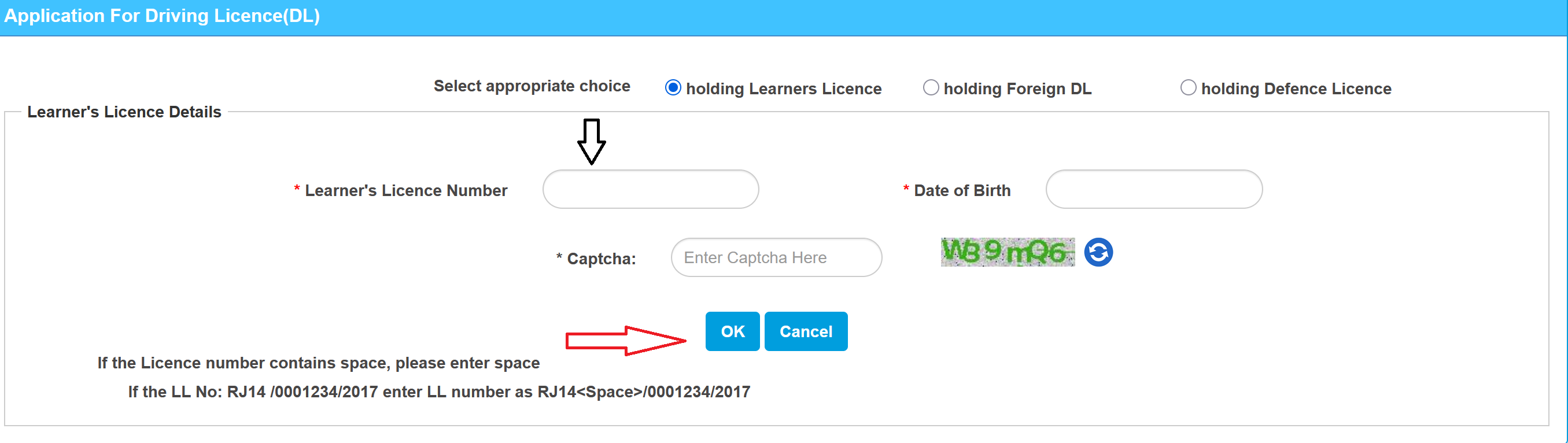
- Pay the fee online. The standard charges are approximately ₹200 for the DL application and ₹300 for the driving test, totalling around ₹500. The exact amount may vary slightly by state.
- Book a slot for your driving test at the RTO.
- On the test day, go to the RTO with:
- Your original Learner's Licence
- The vehicle you'll take the test on (either your own or one arranged through a driving school)
- Payment receipt and a printout of the application
- Original documents for verification
Check Application Status
Once you have submitted an application (Learner's Licence, permanent DL, renewal, or duplicate) on Sarathi, you can track the progress using the following method:
- Go to sarathi.parivahan.gov.in and select your state.
- Click on Application Status.
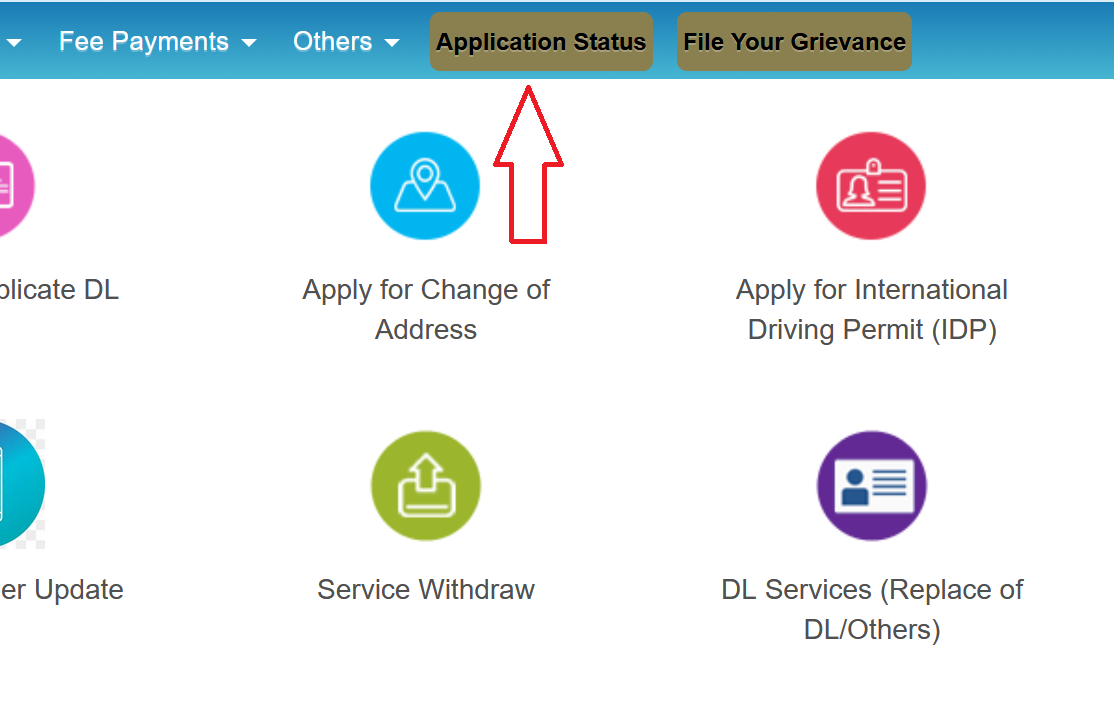
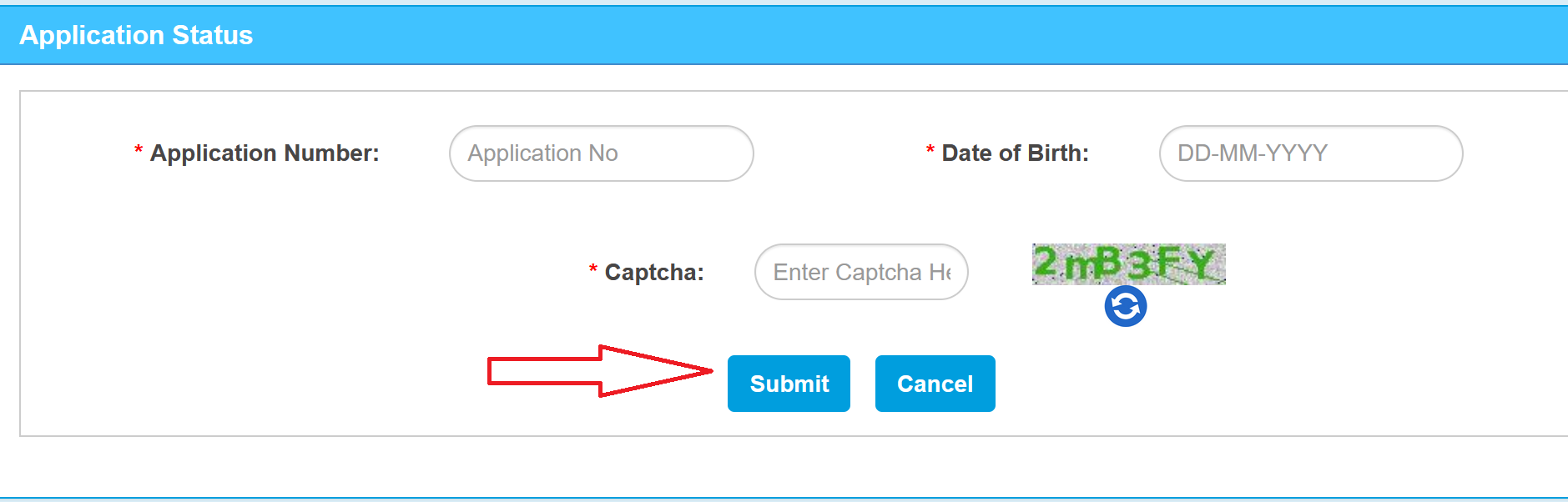
- Enter your Application Number, Date of Birth, and the captcha code.
- Hit Submit.
You'll see one of these status messages:
- Under Process / Pending at RTO means the application is still being reviewed or is waiting for your test/appointment.
- Application Approved means it's been cleared and your licence is being prepared for printing.
- Licence Printed means the physical card has been printed and is about to be dispatched.
- Dispatched means it's been handed over to speed post. From here, it usually takes 5 to 15 days depending on your location.
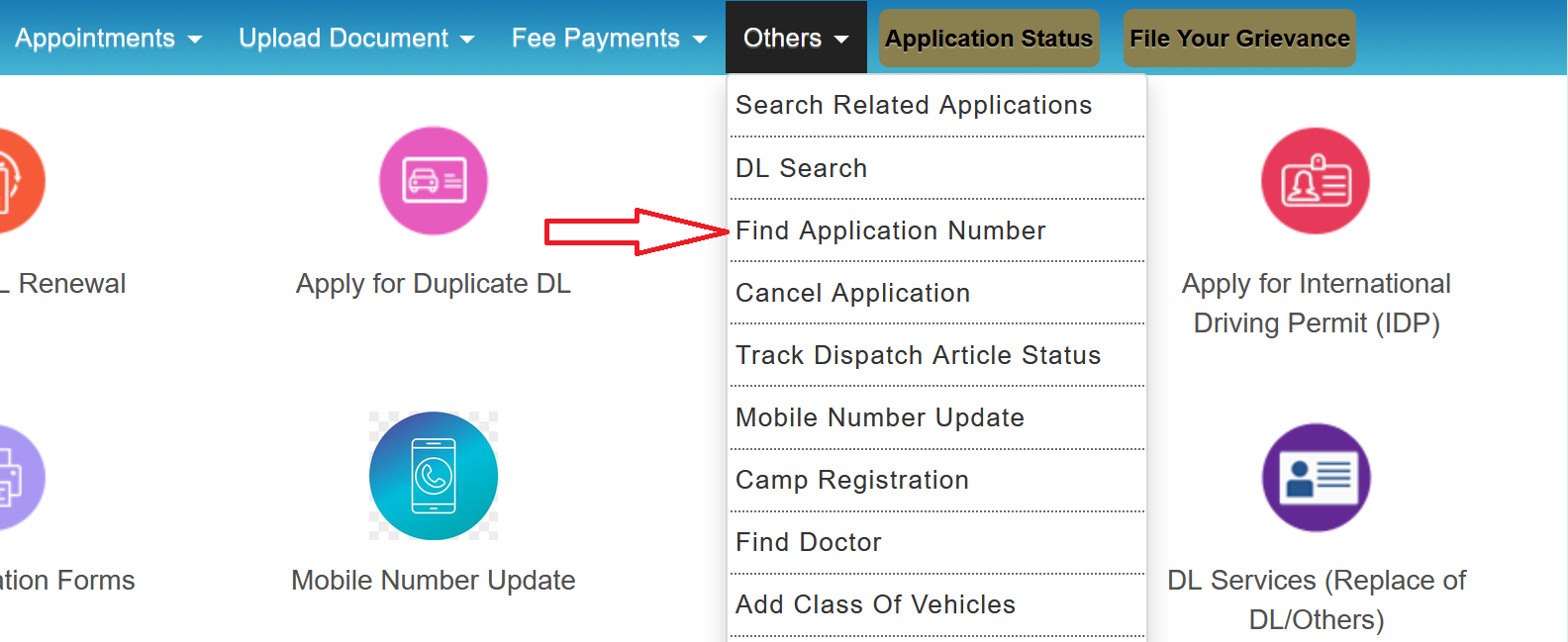
Download / Print Driving Licence
Once your driving licence has been issued, you can download or print a copy at any time through the following methods:
- Go to sarathi.parivahan.gov.in and select your state.
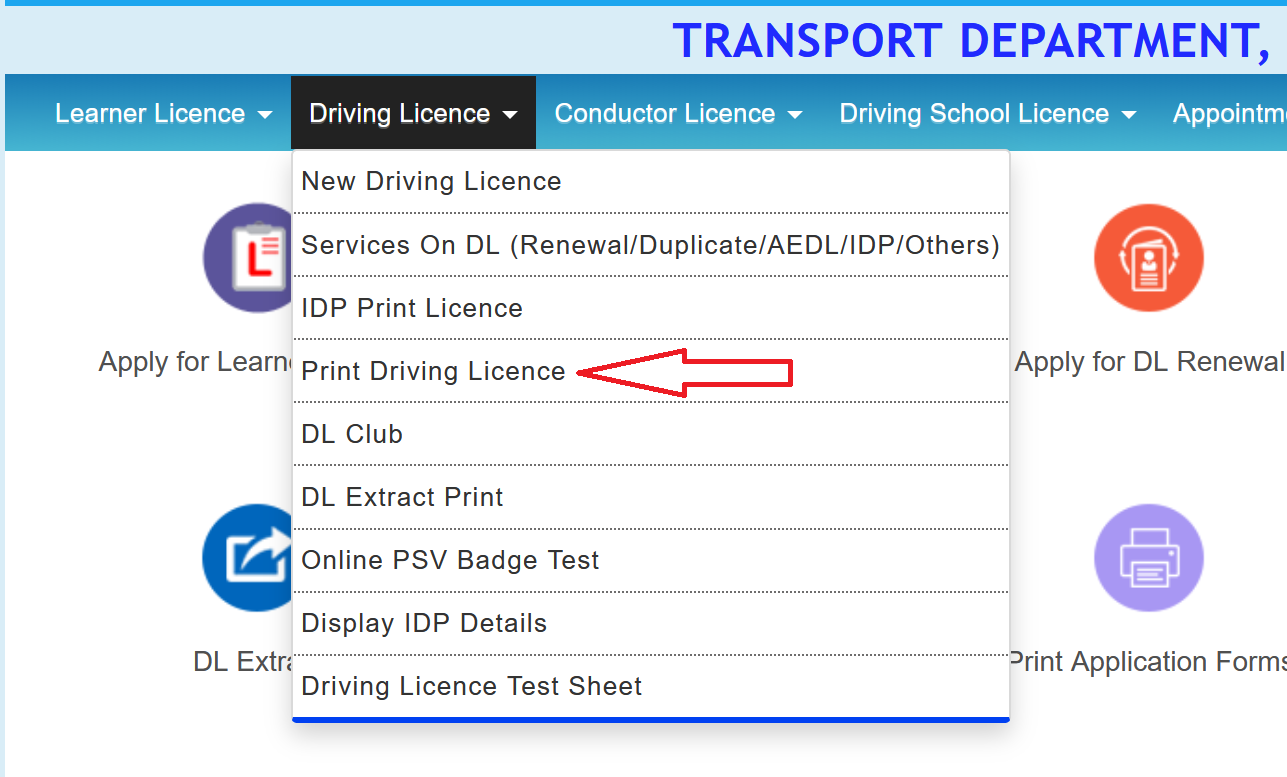
- Click Driving Licence, then Print Driving Licence.
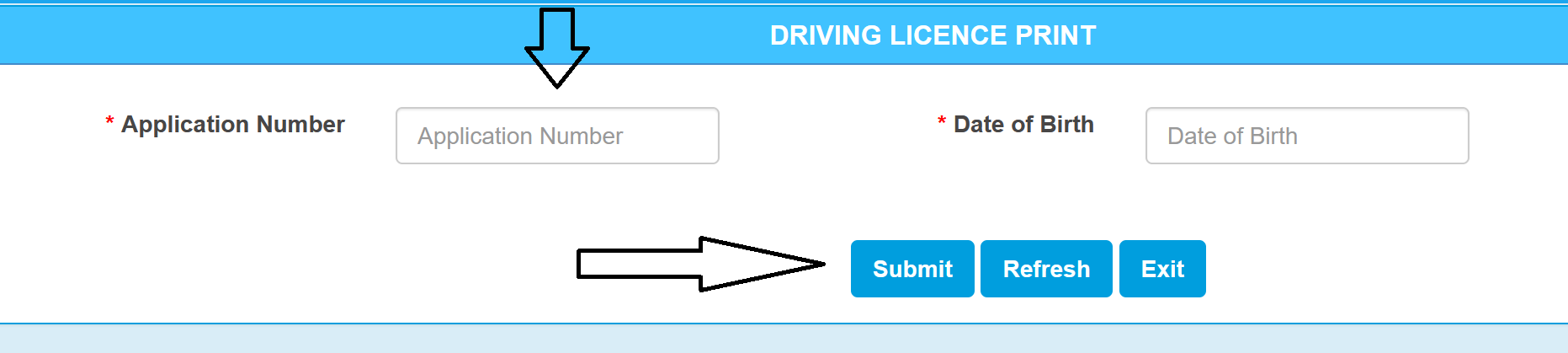
- Enter your DL Number (or Application Number) and Date of Birth.
- Click Submit. Your licence details will show up on screen.
- Click Print to save it as a PDF or take a printout.
Driving Licence Renewal
Driving licences have a limited validity period. For non-transport vehicles (personal cars and two-wheelers), the licence is valid for 20 years or until the holder turns 50, whichever comes first. After the age of 50, renewal is required every 5 years. Transport and commercial vehicle licences have shorter validity periods.
Importance of Application Renewal Timing:
- Up to 1 year before expiry: You can apply early. This is the recommended approach as it ensures there is no gap in your licence validity.
- Within 30 days after expiry: The renewed licence validity is backdated to the original expiry date, so there is no gap in your record. No additional fees apply.
- More than 30 days after expiry: Validity starts from the date of application, not the original expiry date. An additional late fee of ₹30 is charged, and there will be a gap in your licence record.
- More than 5 years after expiry: Most RTOs require you to go through the entire application process again, including a fresh driving test. It is advisable not to delay renewal beyond this point.
Online Renewal Process:
- Go to sarathi.parivahan.gov.in and select your state.
- On the dashboard click Apply for DL Renewal.
- Enter your DL Number, Date of Birth, and the captcha.
- Click Get DL Details. Your existing licence information will load up.
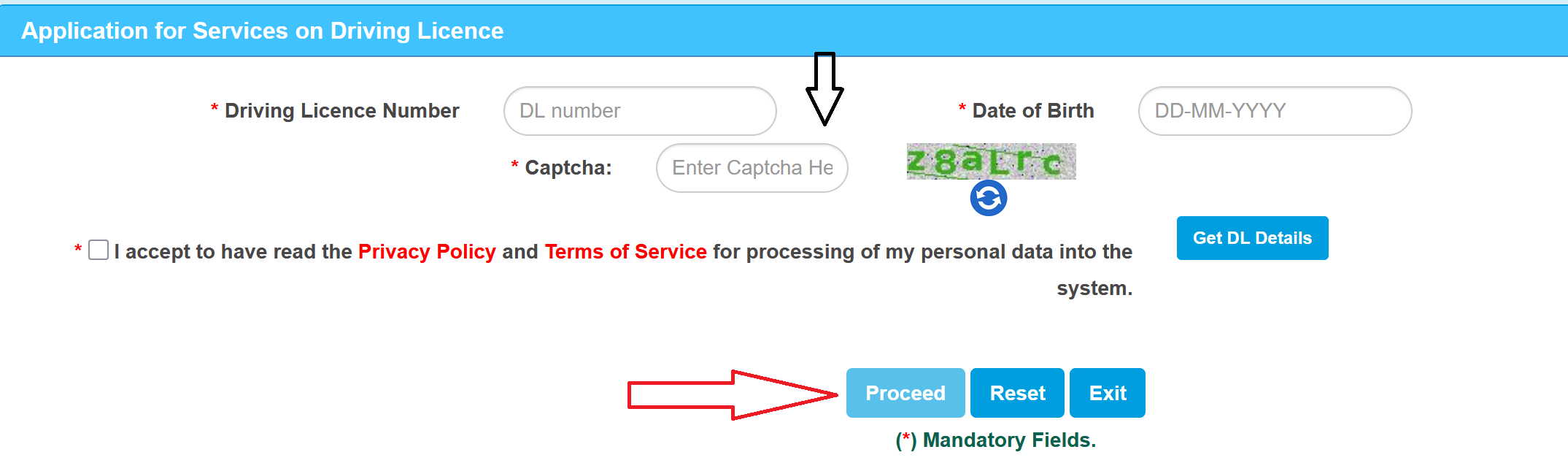
- Verify your details, select the licence category, RTO, and state.
- Click Proceed and update any information that's changed (like your address).
- Upload documents: Form 1 or 1A, address proof, photograph.
- Pay the renewal fee online. Base fee is ₹200, but it varies slightly by state.
- You'll get an appointment date for RTO verification.
- Visit the RTO on that date with your originals. After verification, the renewed licence will be sent to your registered address.
Vehicle Related Services (Vahan Portal)
The Vahan portal (vahan.parivahan.gov.in) handles all vehicle-related services in India. From registering a new vehicle to transferring ownership or paying road tax, every service is accessible online through your state-specific Vahan dashboard. Below is a complete list of services available on the portal.
| Service | What it covers |
|---|---|
| New Vehicle Registration | Registering a newly purchased two-wheeler or four-wheeler to obtain a Registration Certificate (RC) |
| Registration Renewal | Renewing your RC before or after expiry. Private vehicles require renewal every 15 years, commercial vehicles every 5 years |
| Transfer of Ownership | Transferring vehicle ownership when buying or selling a used vehicle. Requires Forms 29 and 30 |
| Duplicate RC | Applying for a replacement Registration Certificate in case of loss, theft, or damage |
| Change of Address | Updating the registered address on your vehicle records, including interstate transfers |
| Hypothecation Addition | Recording a loan or finance agreement against the vehicle in RTO records |
| Hypothecation Termination | Removing the loan or finance entry from RTO records after the vehicle loan is fully repaid |
| No Objection Certificate (NOC) | Obtaining an NOC (Form 28) for relocating a vehicle from one state to another |
| Fancy Number Allocation | Booking a special or VIP registration number through an online auction system |
| Road Tax Payment | Paying vehicle road tax online (quarterly or annually, depending on the state) |
| Fitness Certificate | Applying for or renewing the fitness certificate required for commercial and transport vehicles |
| National Permit | Applying for permits that allow commercial vehicles to operate across multiple states |
| Vehicle Information Lookup | Checking any vehicle's registration details, owner information, and insurance status using the registration number |
| RC Print / Download | Downloading or printing your Registration Certificate from the portal |
| Application Status | Tracking the status of any pending vehicle-related application |
| Fee Payment | Online payment for any Vahan service via UPI, net banking, or card |
Access Vahan Portal Services:
- Go to parivahan.gov.in.
- Under Online Services, click on Vehicle Related Services.
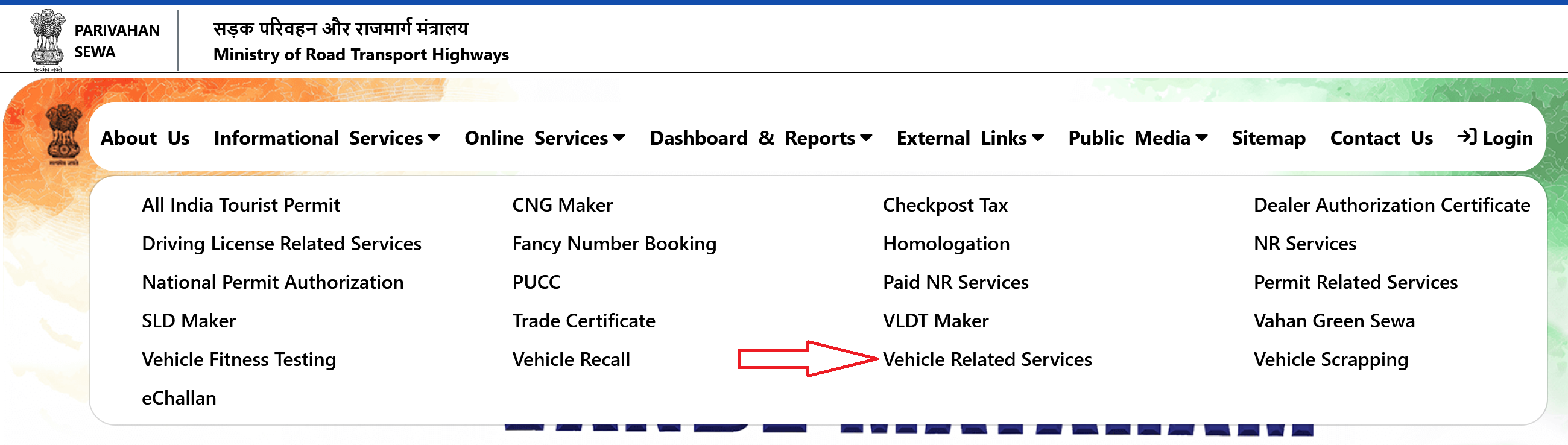
- Select your state.
- You'll land on the Vahan Citizen Services page.
- Enter your Vehicle Registration Number, Registering Authority (your RTO), State, and RTO name.
- Click Proceed.
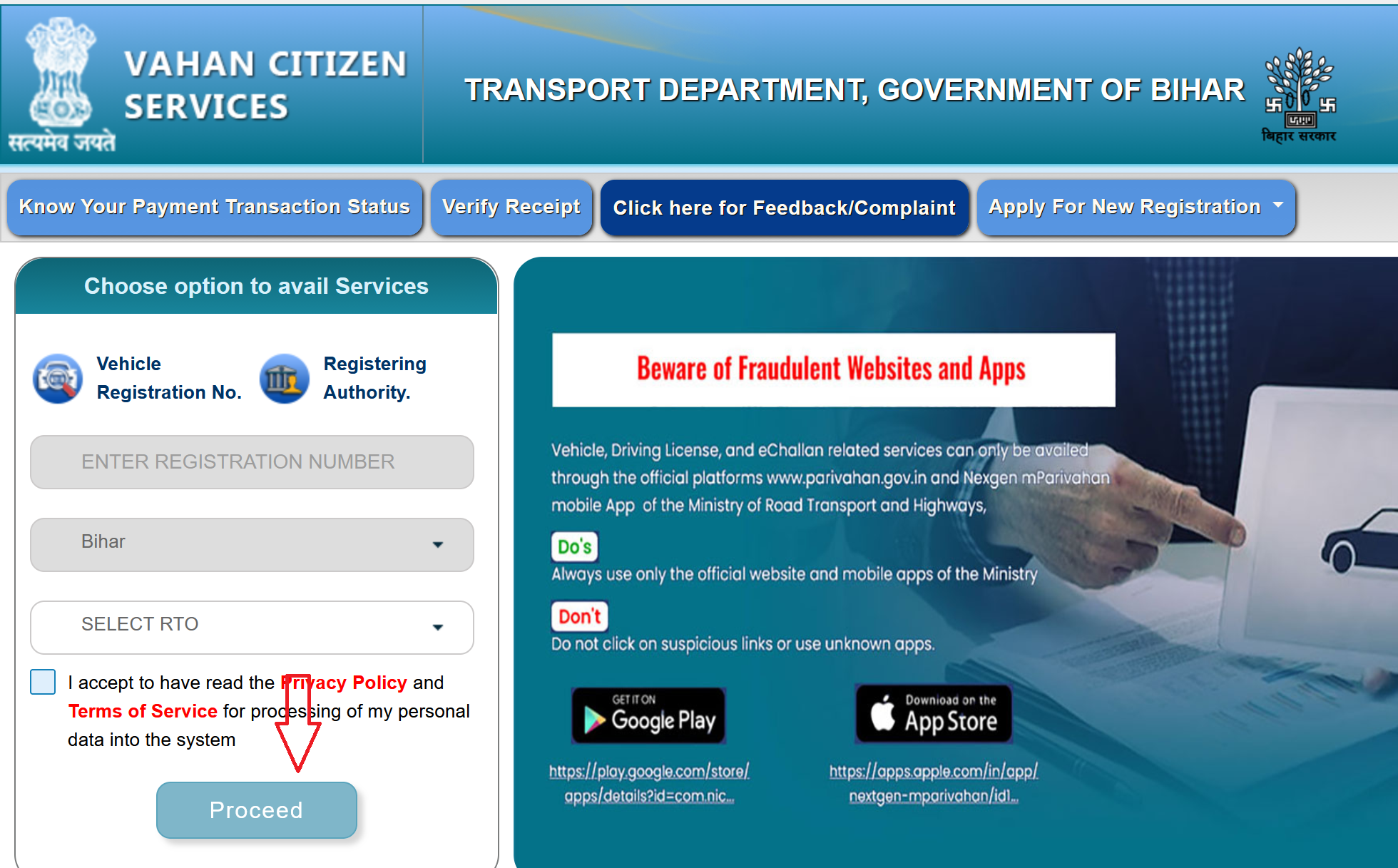
From this dashboard, you can select the required vehicle service. Each service has its own form and document requirements, but this serves as the common entry point for all vehicle-related services.
Check Vehicle Details
You can look up any vehicle's registration details using just its number plate. This is free and works for any vehicle registered in India.
- Go to vahan.parivahan.gov.in/nrservices.
- Click Know Your Vehicle Details.
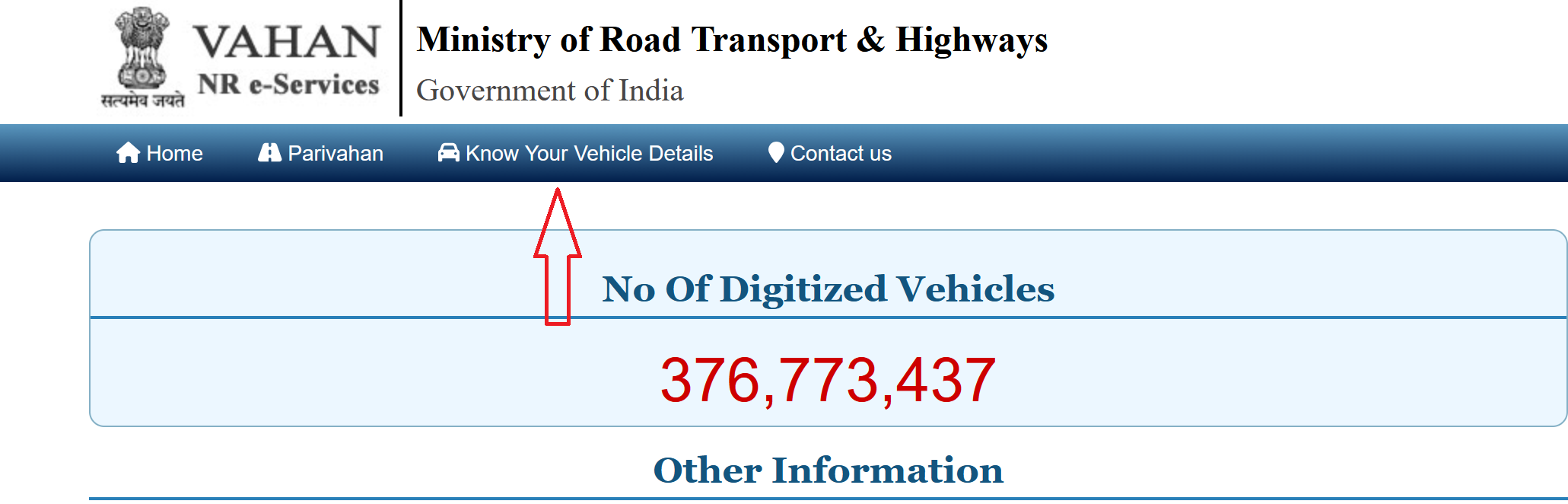
- Log in with your mobile number (one-time registration needed).
- Enter the Vehicle Registration Number and captcha.
- Click Vahan Search.
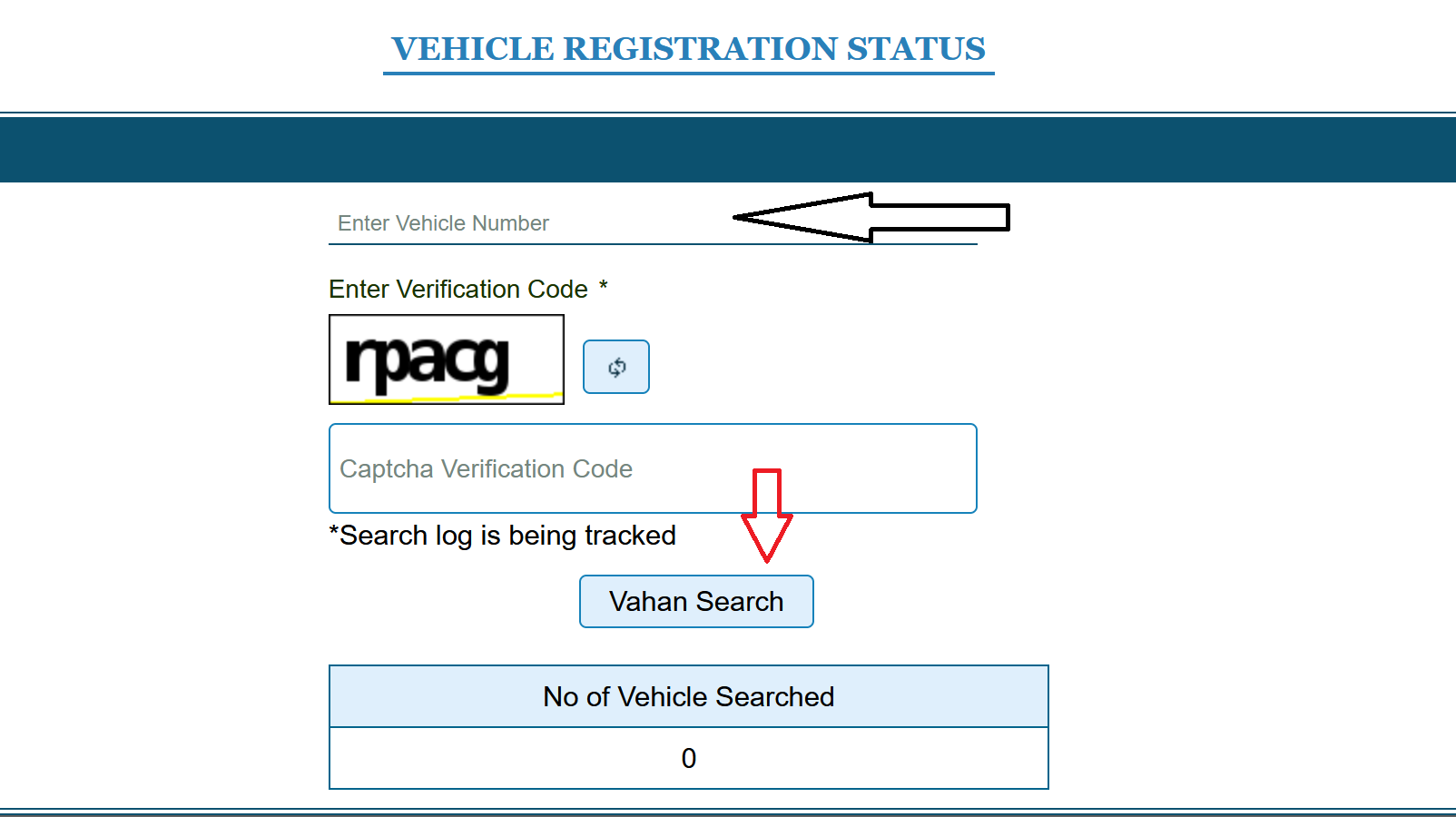
The portal shows you the owner's name (partially masked), registration date, vehicle make and model, fuel type, engine and chassis number, insurance validity, hypothecation status (whether there's an active loan), and PUC certificate status.
You can also do this on the mParivahan app (tap RC Search) or even via SMS by sending VAHAN [registration number] to 07738299899.
Download / Print Your RC
If you need a digital copy of your Registration Certificate (RC), there are three ways to get it:
Through the Vahan Portal:
- Go to parivahan.gov.in and click Online Services > Vehicle Related Services.
- Select your state and log in.
- Enter your vehicle registration number and click Proceed.
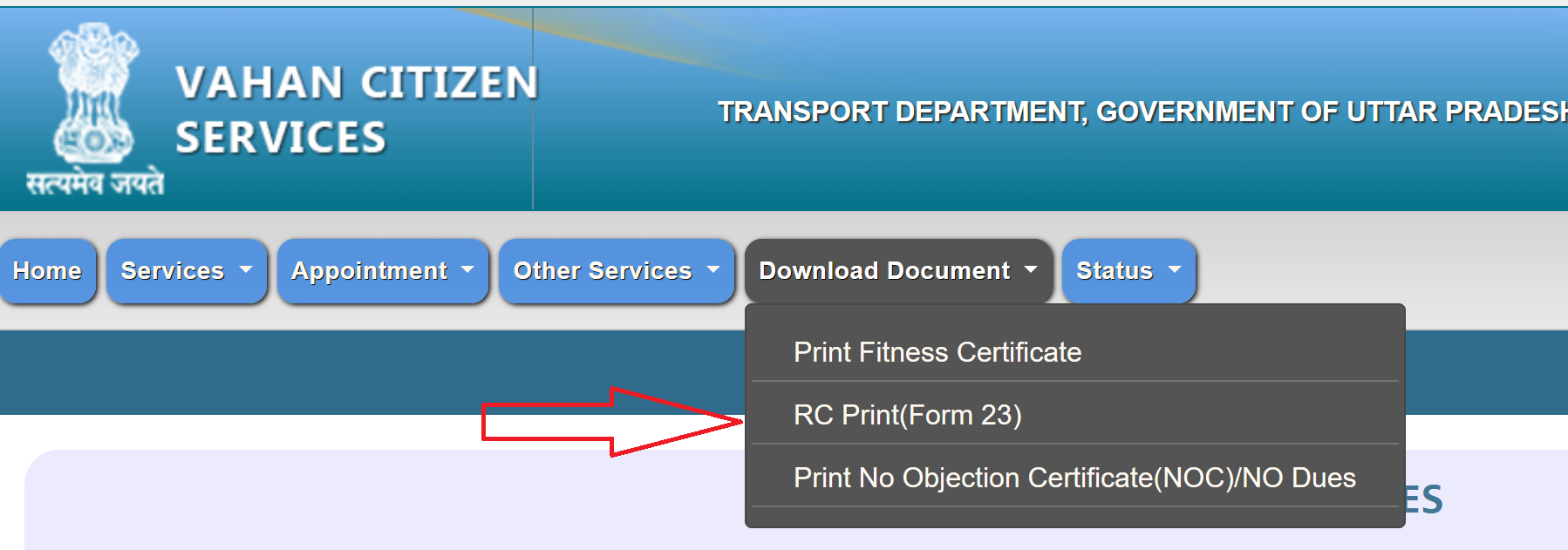
- Click Download Document, then select RC Print (Form 23).
- Enter your registration number, chassis number, and engine number to verify.
- Your RC will appear on screen. Print or save as PDF.

- Through mParivahan App: Add your vehicle using the registration number, and the app stores a live digital copy of your RC that you can show to traffic police anytime. It's legally valid.
- Through DigiLocker: Search for "Vehicle Registration Certificate" under the Ministry of Road Transport issuer, enter your registration number, and DigiLocker will fetch and permanently store your RC as a downloadable PDF.
eChallan Portal : Check and Pay Traffic Fines
The eChallan portal (echallan.parivahan.gov.in) is a digital traffic enforcement system developed by the Ministry of Road Transport and Highways. It integrates with traffic cameras and police systems across the country to issue and manage electronic challans for traffic violations. Below is a complete list of services available on the portal.
| Service | What it covers |
|---|---|
| Check Challan Status | Look up pending or paid challans using your vehicle number, DL number, or challan number |
| Pay Challan Online | Pay traffic fines online via UPI, net banking, credit/debit card, or digital wallets |
| View Violation Details | See the type of violation, date, location, fine amount, and photo evidence (where available) |
| Check Delhi Traffic Challan | Dedicated lookup for challans issued in Delhi, accessible directly from the portal homepage |
| Check Delhi Traffic Notice | View traffic notices issued by Delhi traffic police for pending violations |
| Check Failed Transaction | Verify and resolve payment attempts that did not complete successfully |
| Check Pending Transaction | Track payments that have been initiated but not yet confirmed or reflected in the system |
| Virtual Court Payment | Pay fines directed to virtual courts for cases that have escalated beyond the standard payment window |
| File a Complaint | Dispute an incorrect challan by submitting a complaint with supporting evidence (e.g., vehicle not at the location) |
| Download Payment Receipt | Download or print a digital receipt after successful challan payment for your records |
| eChallan Dashboard | View state-wise and national statistics on challans issued, collected amounts, and enforcement data |
Check Challan Status or Pay Challan Online
- Go to echallan.parivahan.gov.in.
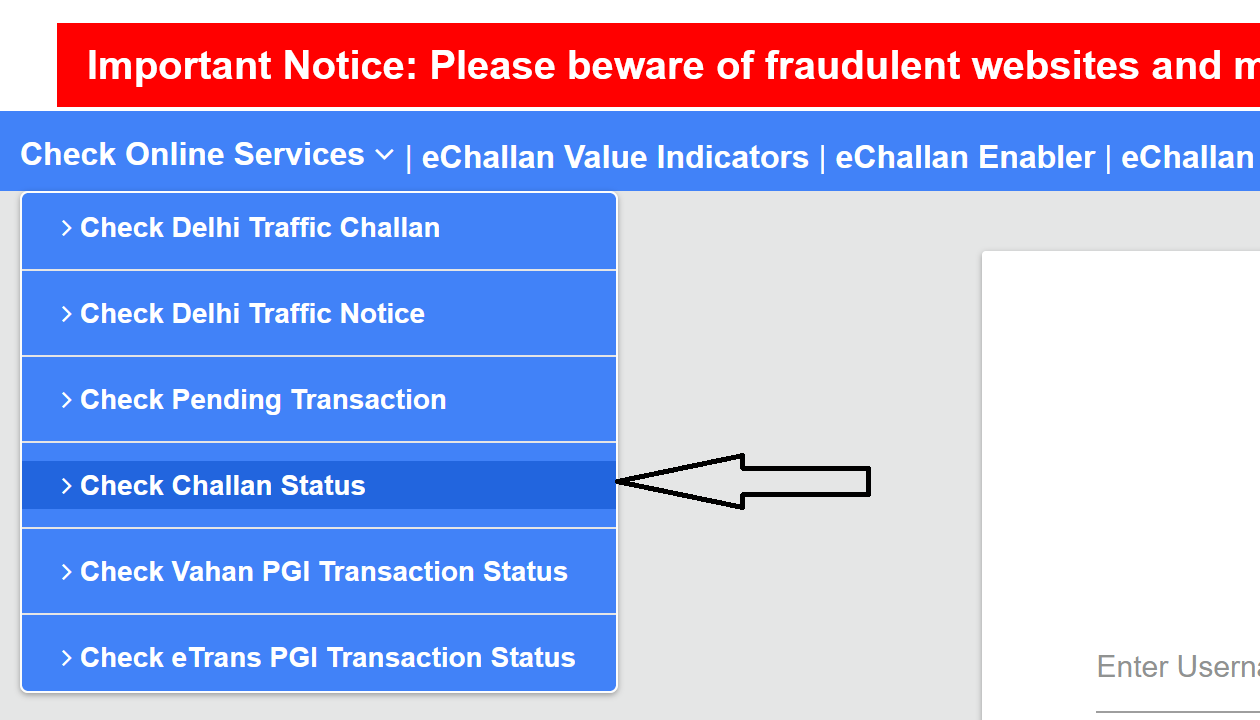
- Under "Check Online Services," click on Check Challan Status.
- You can search using any of these:
- Challan Number (if available)
- Vehicle Number
- DL Number
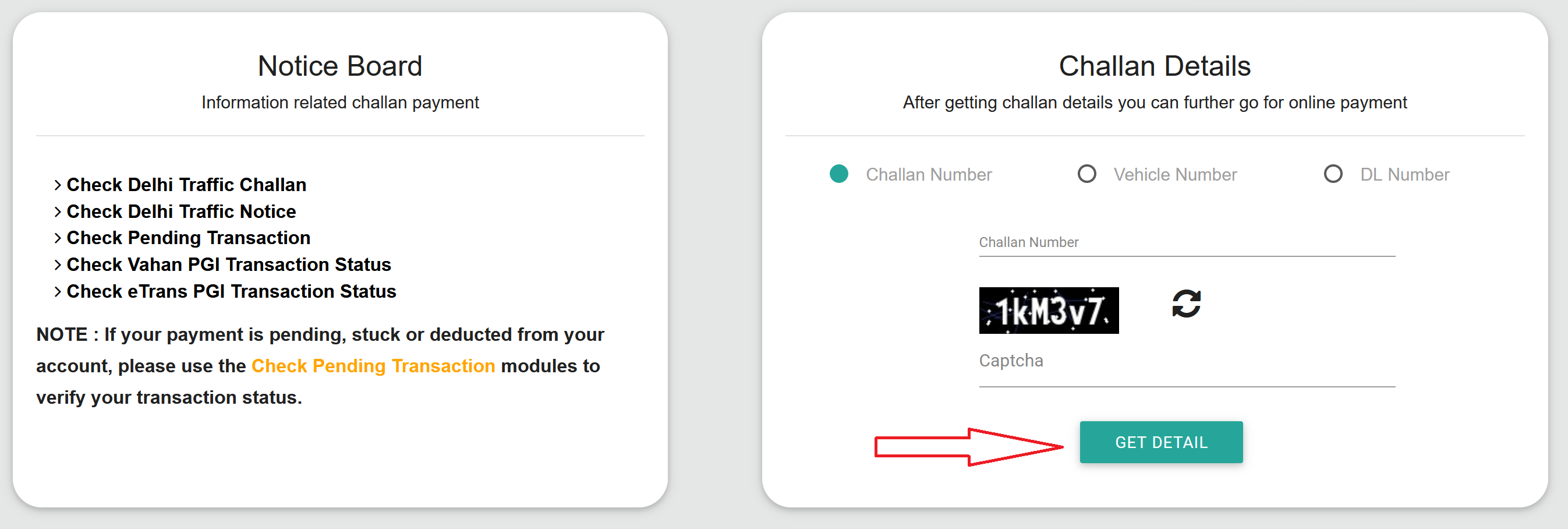
- Click Get Details.
- Your challan details will be displayed, including the type of violation, date and location, fine amount, and payment status.
- If the challan is unpaid, click "Pay" and complete the payment via UPI, net banking, or debit/credit card.
- A payment confirmation with a transaction ID will be sent to your registered mobile number.
Fees and Charges
| Service | Approximate Fee |
|---|---|
| Learner's Licence (LL) | ₹200 |
| Permanent Driving Licence (DL) | ₹200 |
| Driving Test Fee | ₹300 |
| DL Renewal | ₹200 |
| Late Renewal (beyond 30-day grace) | ₹200 + ₹30 extra |
| Duplicate DL | ₹250 |
| International Driving Permit (IDP) | ₹1,000 |
| Adding Vehicle Class to DL | ₹500 |
| Smart Card DL (where available) | ₹200 extra |
Important Forms
The Sarathi portal references specific form numbers throughout the application process. Knowing what each form is for helps avoid confusion during document upload.
Driving Licence Forms
| Form | What it's for |
|---|---|
| Form 1 | Self-declaration of physical fitness (for non-transport vehicles, applicants below 40) |
| Form 1A | Medical certificate from a registered doctor (for transport vehicles or applicants aged 40 and above) |
| Form 2 | Application for Learner's Licence, permanent DL, renewal, duplicate, or additional vehicle class |
| Form 4A | Application for International Driving Permit (IDP) |
| Form 5 | Driving certificate issued by an accredited driving school |
Vehicle Forms
| Form | What it's for |
|---|---|
| Form 25 | RC renewal |
| Form 26 | Duplicate RC |
| Form 28 | NOC for vehicle transfer (when moving to another state) |
| Form 29 | Notice of transfer of ownership |
| Form 30 | Application for ownership transfer |
| Form 35 | Hypothecation termination (after closing your vehicle loan) |
Helpline and Support
| For | Phone | Available | |
|---|---|---|---|
| Vehicle Registration, Tax, Permit, Fitness | helpdesk-vahan@gov.in | +91-120-4925505 | 6:00 AM to 12:00 Midnight |
| Driving Licence (Sarathi) | helpdesk-sarathi@gov.in | -- | -- |
| mParivahan App | helpdesk-mparivahan@gov.in | -- | -- |
| eChallan | helpdesk-echallan@gov.in | -- | -- |
Important Notes
The portal slows down during peak hours.
If the site is crawling or throwing timeout errors, try again early in the morning or late at night. End of the month and the March financial year-end period are especially bad.
Get your documents scanned properly before starting.
Most uploads need to be JPEG, under 200KB. The photo should have a plain white background, and the signature should be clear on a white sheet. A surprising number of applications get stuck because the uploaded files don't meet the format requirements.
Your LL expires in 6 months, no extensions.
If you don't apply for the permanent DL within this window, you start from zero. The 30-day mandatory wait begins from the LL issue date, so the actual window you have is 30 days to 6 months.
Always take originals to the RTO.
Even though everything is uploaded online, the RTO will verify your original documents on the test day or appointment day. If you forget them, they'll send you back.
Your digital DL and RC are legally valid.
If a traffic police officer asks for your licence and you show it on the mParivahan app or DigiLocker, that's completely legal. This is backed by the IT Act and the Motor Vehicles Act. You don't need the physical card.
Save every application number and receipt.
The portal generates application numbers, SRNs, and payment receipts at various stages. Screenshot all of them. You'll need these for tracking, rescheduling appointments, and resolving any disputes.
Check vehicle history before buying second-hand.
Use the Vahan portal to verify registration details, insurance status, and fitness certificate. Use eChallan to check for pending fines. This five-minute check can save you from a lot of problems down the line.