
Driving Licence Download 2026
Step 1: Open the Sarathi Parivahan Website · Step 2: Go to "Driving Licence" Section · Step 3: Select Your State · Step 4: Click on "Print Driving Licence" · Step 5: Enter Your DL Number and Date of Birth · Step 6: Verify With OTP · Step 7: View and Download Your DL as PDF
When Do You Need a Digital Driving Licence?
A digital copy of your driving licence can be useful in many situations. Here are some common scenarios:
| Scenario | How a Digital Copy Helps |
|---|---|
| New DL approved but not yet delivered | A downloaded copy serves as valid proof while the physical card is in transit |
| Physical card lost or damaged | A digital copy keeps you covered while you apply for a duplicate licence |
| Stopped by traffic police | Display your DL on your phone via mParivahan or DigiLocker, both accepted by traffic authorities across India |
| Required as identity proof | A digital or printed copy is accepted by most institutions for passport applications, bank KYC, and employment verification |
| Travelling without the original | A digital copy on your phone eliminates the risk of losing your physical driving licence while travelling |
Things to Keep Ready Before Downloading Your DL
| Requirement | Why It's Needed |
|---|---|
| Driving Licence Number | Required on the Sarathi Parivahan portal. This is the alphanumeric number on your physical DL, typically starting with your state code (e.g., UP14, DL05, MH02) |
| Date of Birth | All three platforms use it for verification. Must match your driving licence records exactly |
| Registered Mobile Number | Linked to your Aadhaar or Sarathi account. OTPs for verification are sent to this number |
| Aadhaar Number | Required only for DigiLocker, which uses Aadhaar-based authentication to fetch your driving licence |
| Stable Internet Connection | Ensures the download process completes without interruptions on both browser and mobile app |
Which Method Is Best for You?
All three methods are free and reliable, but each serves a distinct purpose.
| Method | Best For | When to Use |
|---|---|---|
| Sarathi Parivahan Portal | Quick PDF download | Need a printable or emailable copy immediately, no account setup required |
| DigiLocker | Official documentation | Bank KYC, passport applications, employment verification, or anywhere a legally verified document is required |
| mParivahan App | Everyday convenience | Traffic checks, quick reference on your phone, replacing the need to carry a physical card |
Method 1: Download from the Sarathi Parivahan Portal
The Sarathi Parivahan portal is the quickest way to download your driving licence as a printable PDF.
Follow these steps:
- Open parivahan.gov.in in your browser.
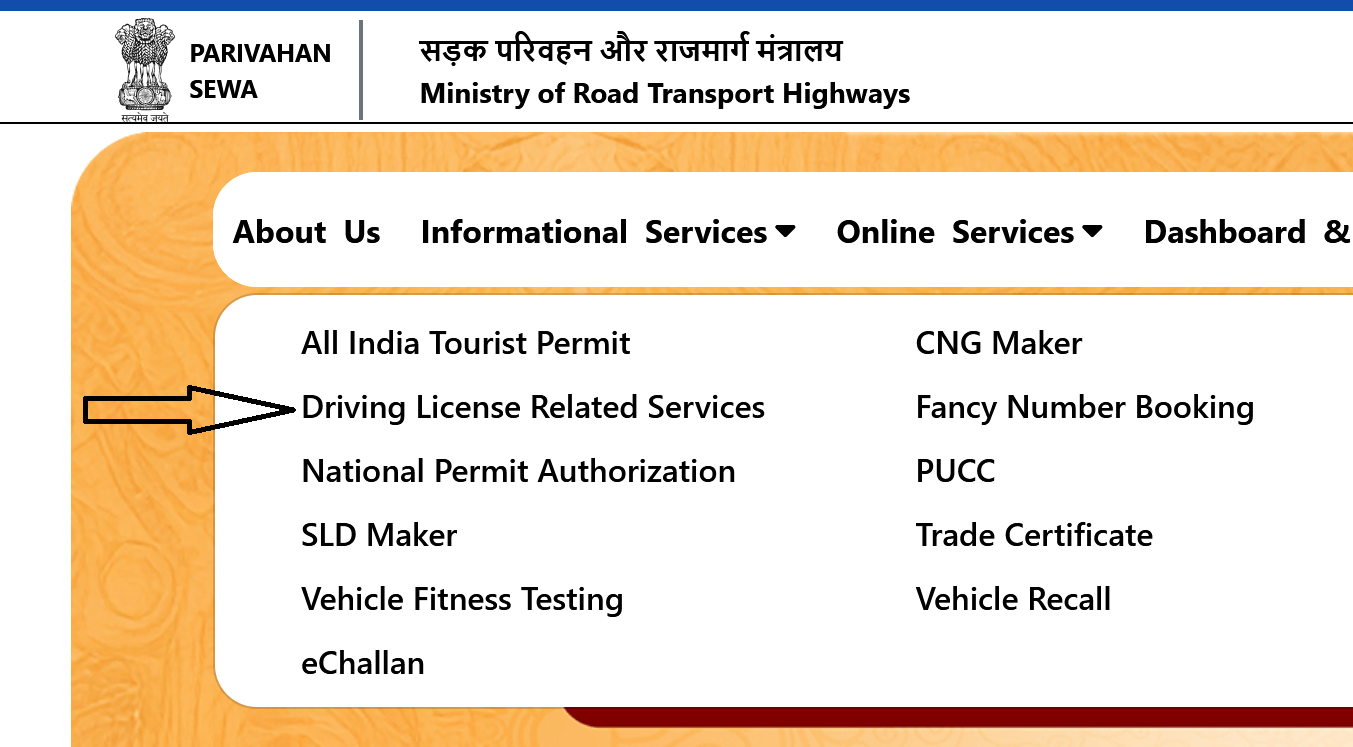
- Hover over "Online Services" in the top menu and click "Driving License Related Services."
- Select the state where your driving licence was originally issued. Choosing the wrong state will result in your records not being found.
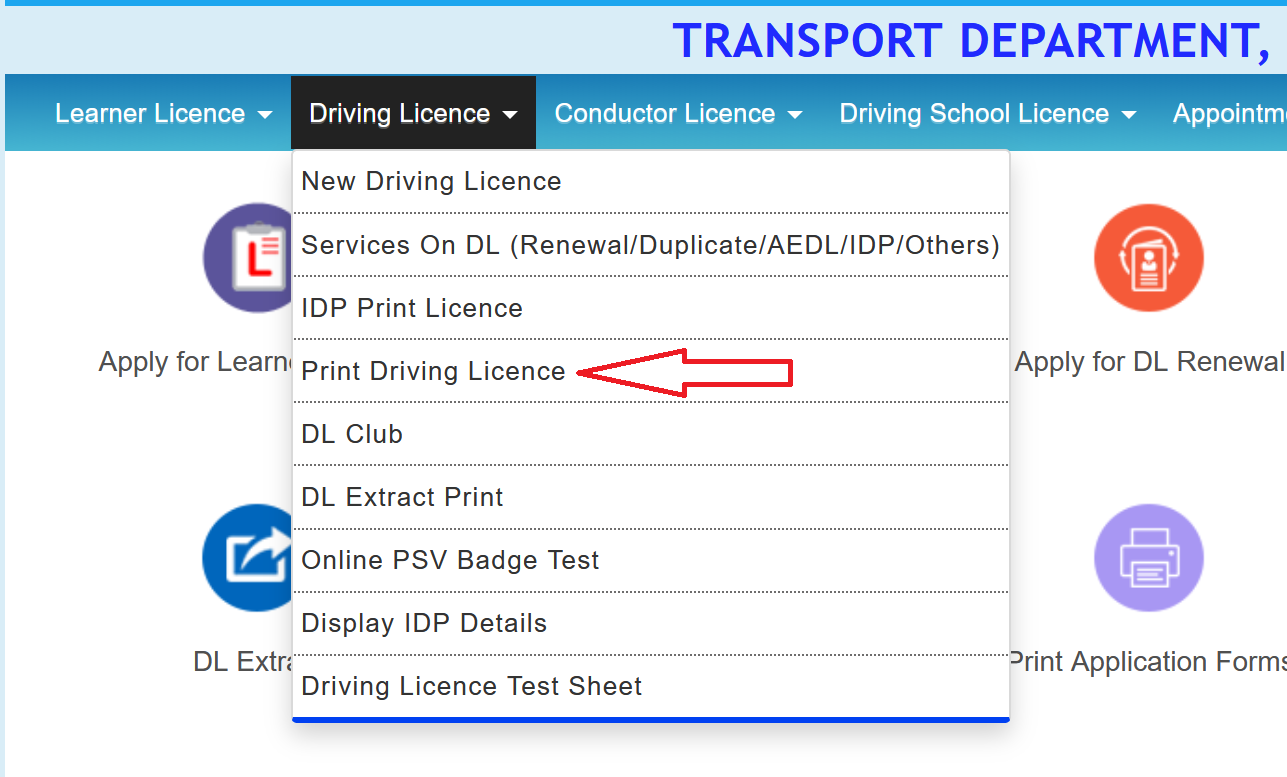
- On your state's Sarathi page, go to Driving Licence → Print Driving Licence.
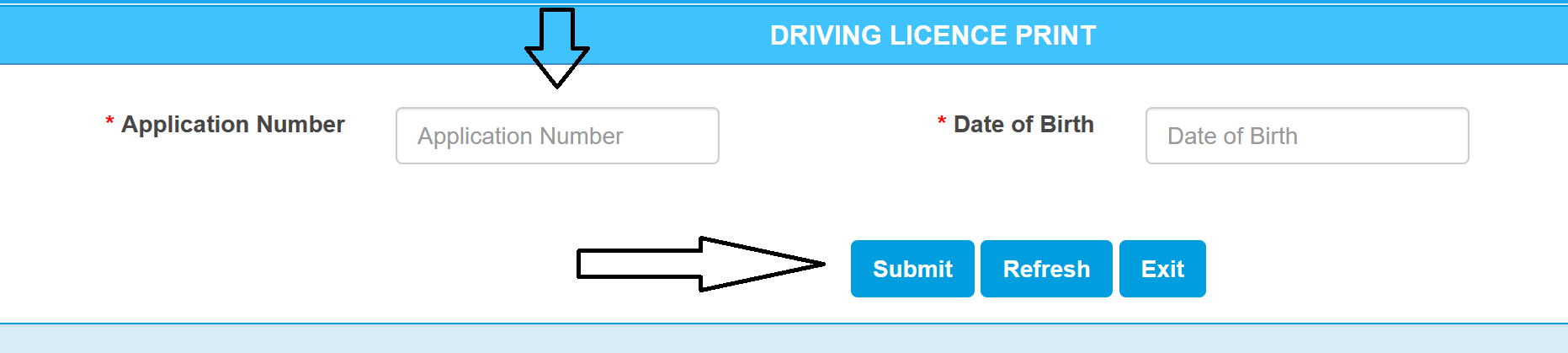
- Enter your DL number and date of birth, then fill in the captcha.
- Click on "DL Print" and the system will generate a PDF of your driving licence, which will start downloading automatically.
Method 2: Download from DigiLocker
If you already have a DigiLocker account, proceed directly to the download steps below. Setting up a new account takes approximately two minutes.
- Open digilocker.gov.in/web/signup in your browser.
- Sign in with your Aadhaar/mobile number and your 6-digit PIN.
- Verify the OTP sent to your Aadhaar-linked phone number.
- On your dashboard, click "Search Documents".
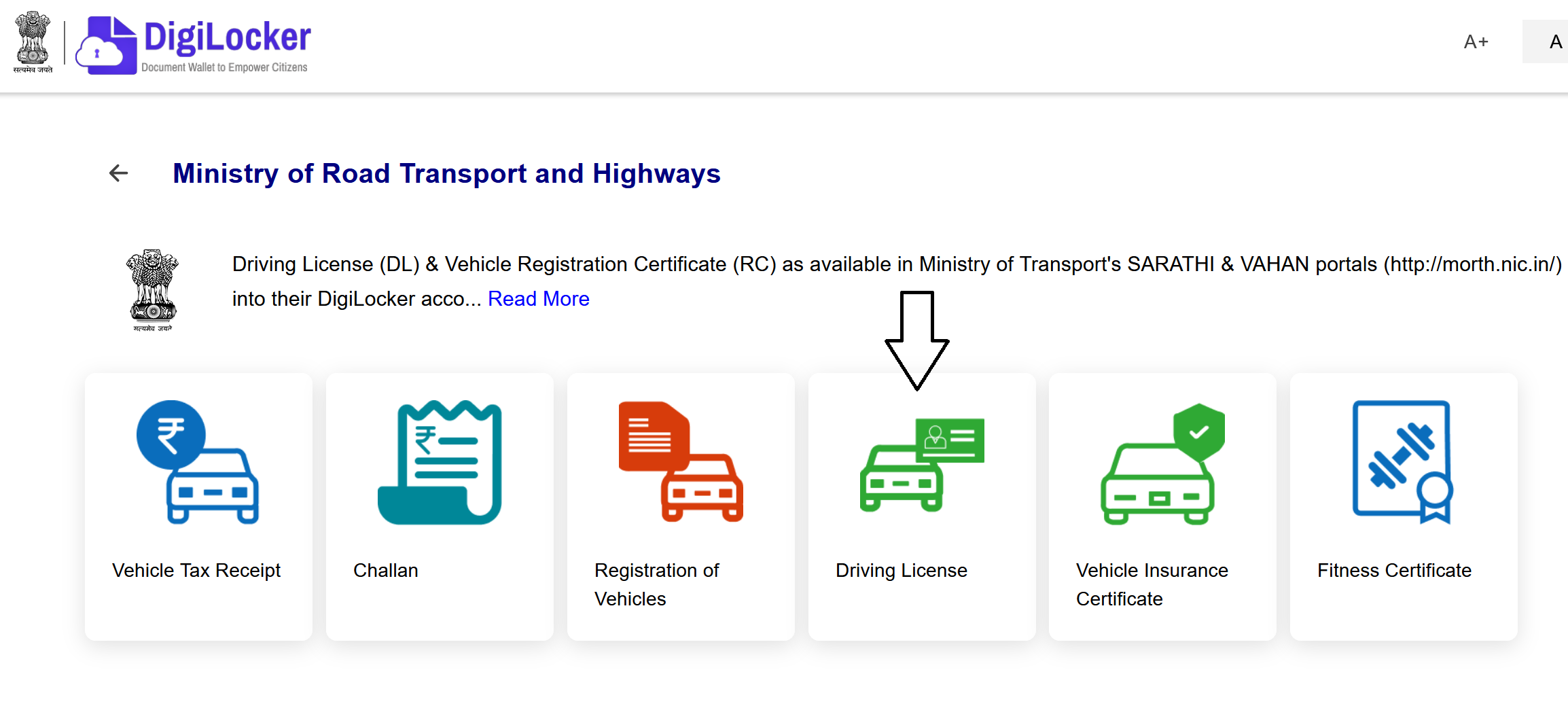
- Type "Ministry of Road Transport and Highways" in the search bar and select it.
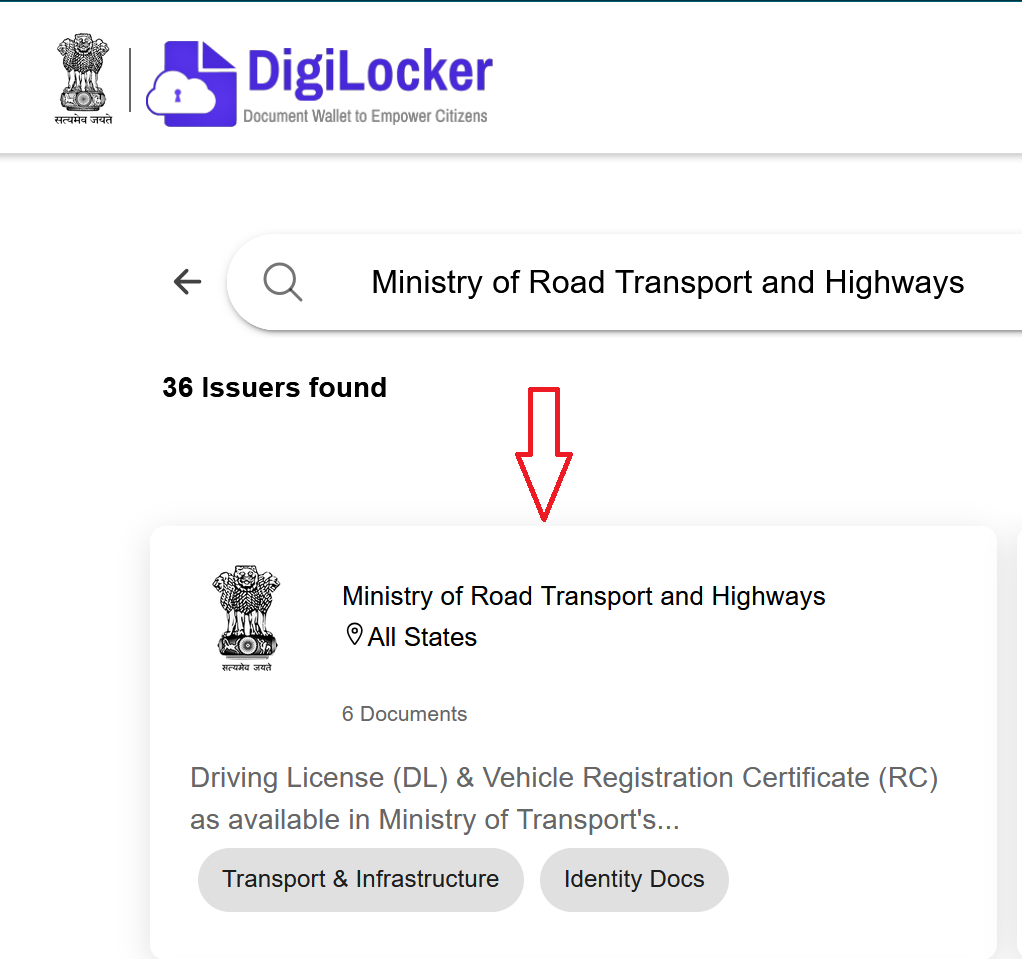
- You will see 6 documents option here, click on Driving Licence.
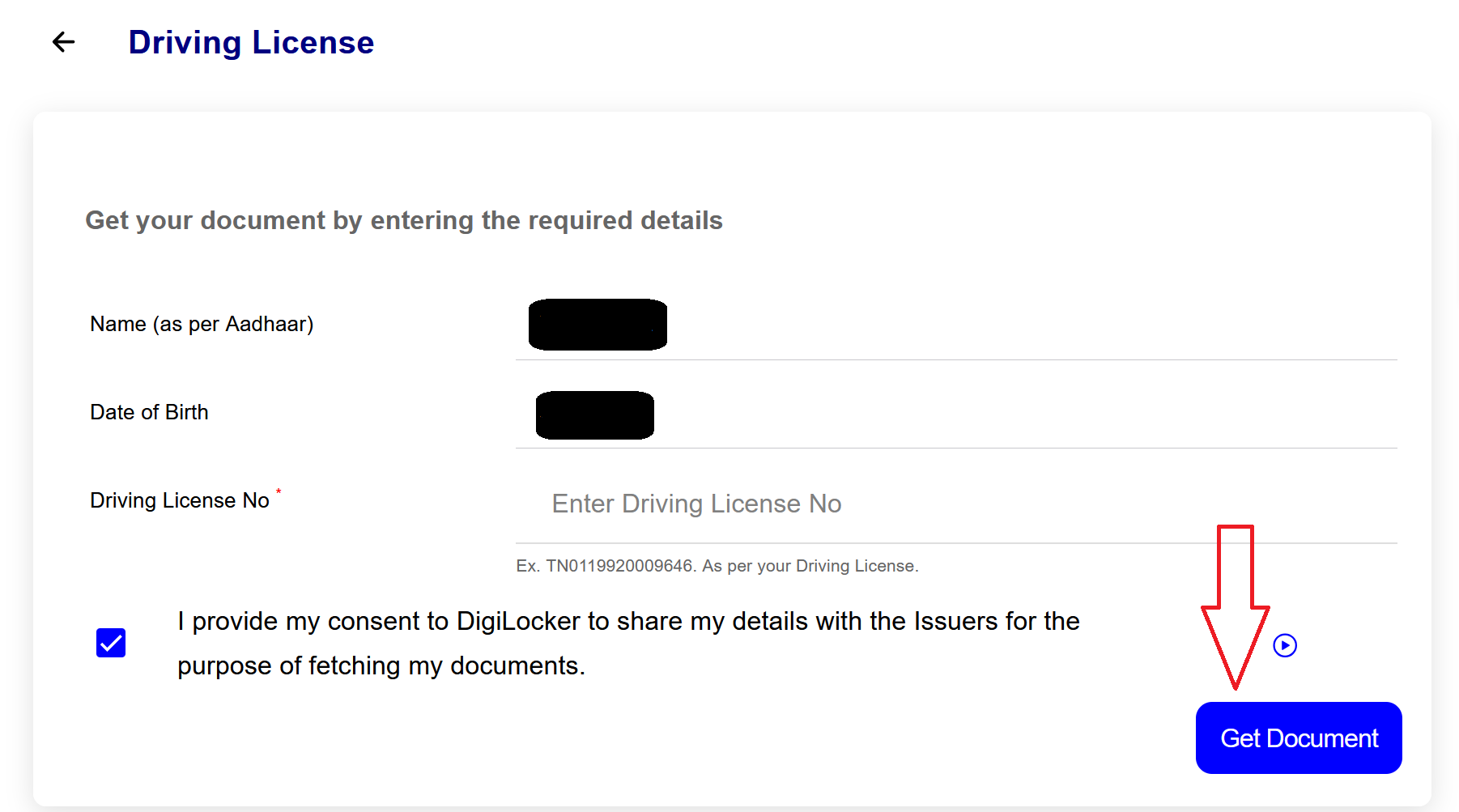
- Enter your DL number and click "Get Document."
- Your licence shows up on screen. Hit Download to save it as a PDF.
Method 3: Virtual DL on the mParivahan App
The mParivahan app provides a virtual driving licence on your phone that is officially accepted by traffic authorities across India.
Follow these steps:
- Download "mParivahan" from the Google Play Store or Apple App Store.
- Open the app and register using your mobile number. Verify your identity through the OTP sent to your device.
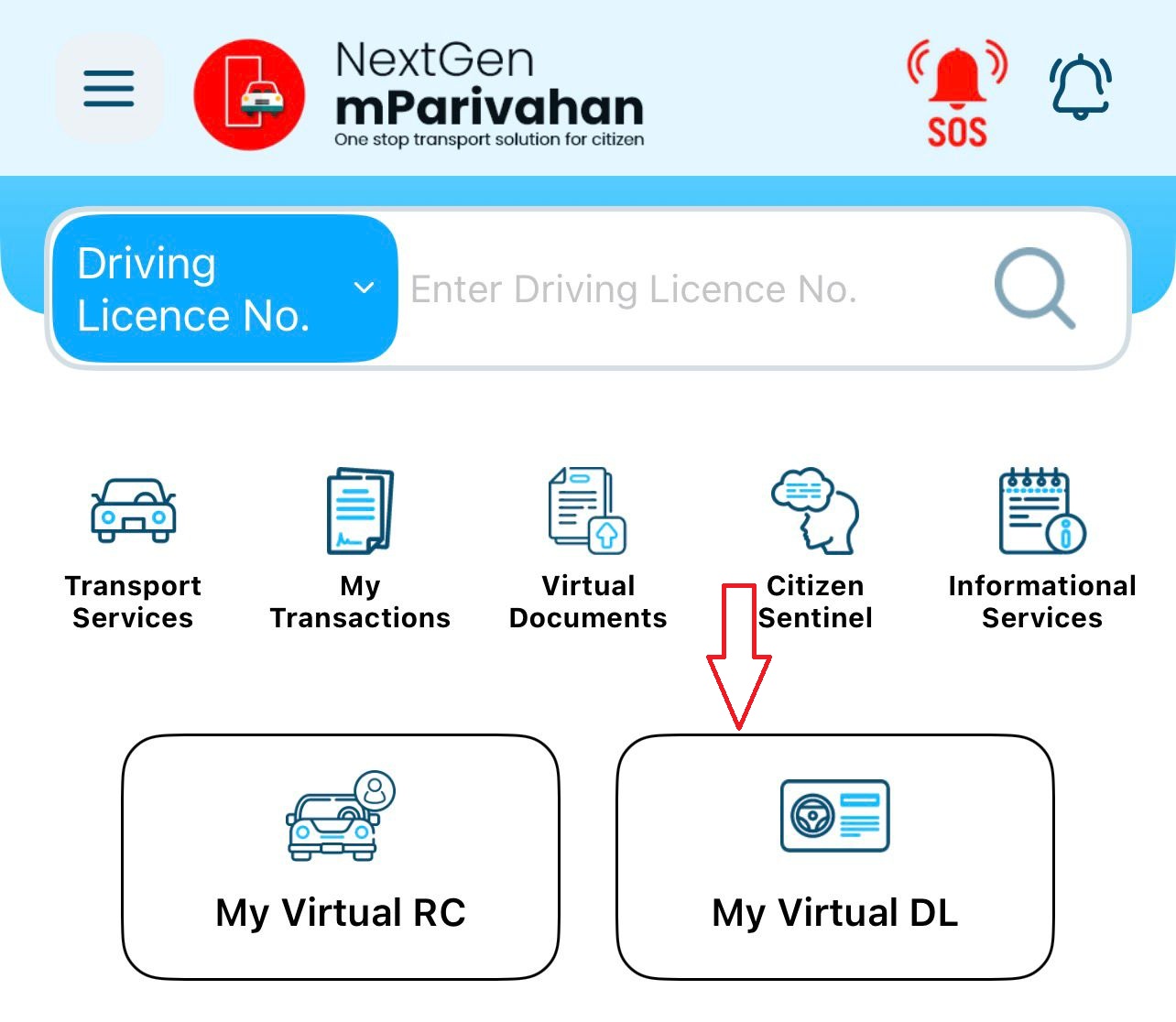
- On the home screen, select "My Virtual DL".
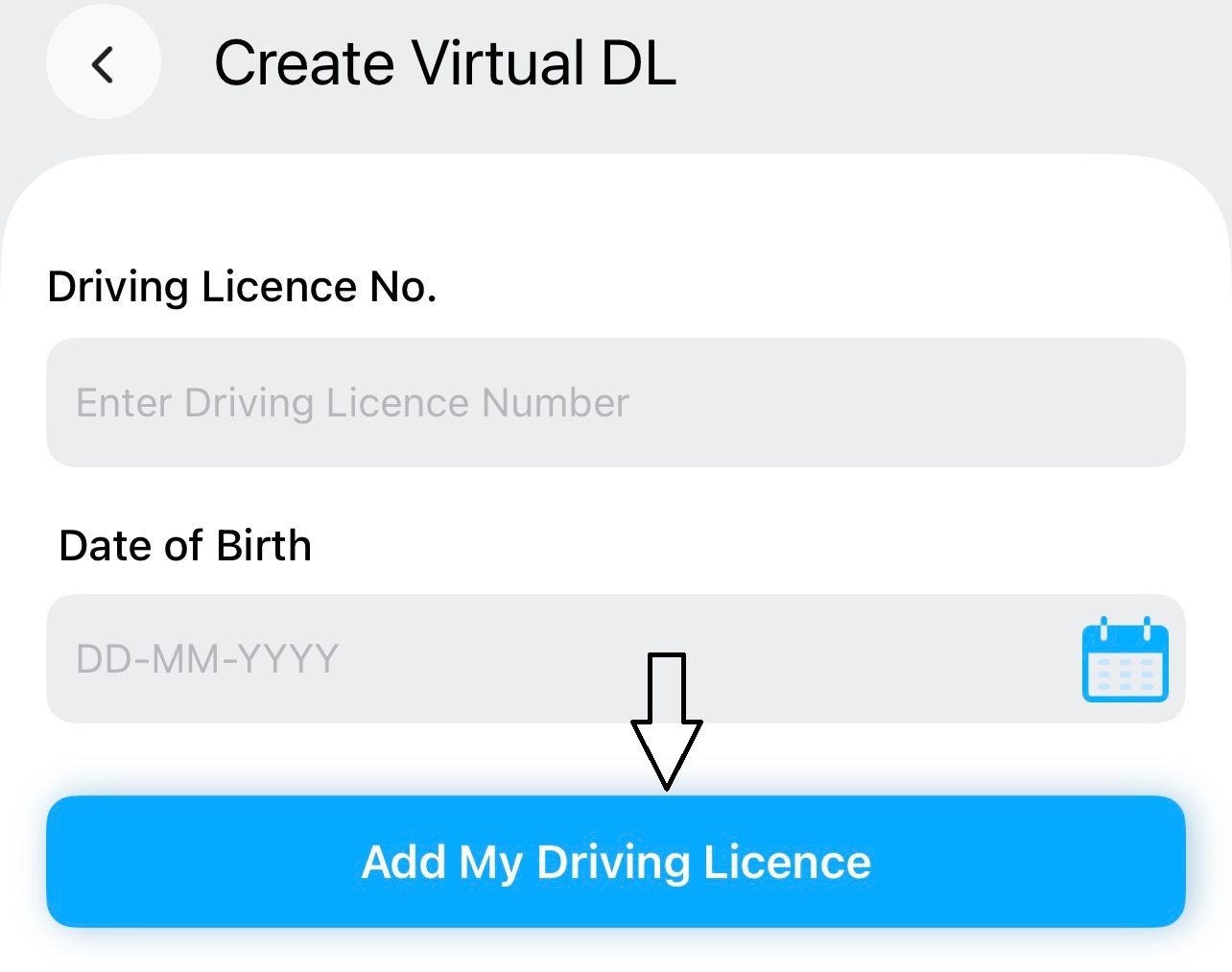
- Enter your driving licence number and date of birth exactly as recorded in government records.
- Select "Add My Driving Licence". The app will retrieve your details from the government database and display your virtual driving licence.
Your virtual driving licence will now display all relevant details, including your photograph, name, licence number, validity period, and authorised vehicle categories.
Details Mentioned on Your Driving Licence
A standard Indian driving licence contains the following information:
- Full Name as recorded in your application.
- Date of Birth.
- Blood Group, included for use in medical emergencies.
- Father's/Guardian's Name.
- Residential Address as provided at the time of application.
- Licence Number, your unique driving licence identifier.
- Issuing Authority, the Regional Transport Office (RTO) that processed your licence.
- Date of Issue.
- Date of Expiry. For non-commercial vehicles, a driving licence is typically valid for 20 years or until the holder turns 50, whichever comes earlier.
- Vehicle Categories, indicating the classes of vehicles you are authorised to operate, displayed as standardised codes.
Vehicle Category Codes on Your Driving Licence
The following codes appear on your driving licence to indicate the vehicle classes you are authorised to operate:
| Code | Full Form | Vehicles Covered |
|---|---|---|
| MC 50CC | Motorcycle 50cc | Motorcycles with engine capacity up to 50cc |
| MCWOG | Motorcycle Without Gear | Gearless two-wheelers such as scooters |
| MCWG | Motorcycle With Gear | Standard geared motorcycles |
| LMV | Light Motor Vehicle | Cars, jeeps, and vans |
| HMV | Heavy Motor Vehicle | Trucks and buses |
| TRANS | Transport | Transport and commercial vehicles |
Understanding Your Driving Licence Number
Your driving licence number follows a structured format. Knowing how it is composed can be helpful when filling out forms or verifying your records.
Using MH0120190001234 as an example:
- MH is the state code (Maharashtra). Other examples include DL for Delhi, UP for Uttar Pradesh, and KA for Karnataka.
- 01 is the RTO code, identifying the specific Regional Transport Office that issued the licence.
- 2019 indicates the year of issue.
- 0001234 is the unique serial number assigned to the holder.
Troubleshooting Common Issues
While the download process is straightforward, you may occasionally encounter errors. Below are the most common issues and how to resolve them.
"No Record Found" or "DL Details Not Available"
This typically occurs when your driving licence data has not been synced to the Sarathi Parivahan database. Older licences issued before digitisation may not appear online. In such cases, visit your issuing Regional Transport Office with your physical driving licence to request a database update.
OTP Not Received
Ensure that the mobile number linked to your driving licence or Aadhaar is active and has network coverage. Wait two to three minutes before requesting a resend. If the issue persists, check whether your device has any SMS blocking or filtering enabled. For DigiLocker and mParivahan, the OTP is sent to your Aadhaar-linked mobile number, not necessarily the number currently in use.
Date of Birth Mismatch
The date of birth you enter must match the records held by the RTO exactly. Even a minor discrepancy will prevent verification. If you suspect an error in your RTO records, you will need to apply for a correction through the Sarathi Parivahan portal or visit the RTO in person.
Portal or App Not Loading
The Parivahan portal experiences heavy traffic during peak hours. Try accessing it during off-peak times, such as early morning or late evening. Clearing your browser cache or switching to a different browser can also help. For app-related issues, ensure you are using the latest version of mParivahan or DigiLocker.
Downloaded PDF Not Opening
This is usually caused by an incomplete download due to a weak internet connection, or the absence of a PDF reader on your device. Re-download the file on a stable connection and ensure a PDF viewer is installed.
Important Notes
Keep the following points in mind to avoid confusion during or after the download process.
Legal Validity of Digital Driving Licence
A digital driving licence downloaded through DigiLocker or displayed on the mParivahan app is legally valid across India under the Motor Vehicles Act, 1988 and the Information Technology Act, 2000.
No Fee for Downloading
There is no charge for downloading your existing driving licence through any of the three methods covered in this article. Fees apply only when applying for a new licence, renewal, or duplicate.
Not Valid for International Use
The digital driving licence is recognised for domestic use only. For driving abroad, you will need your physical driving licence along with an International Driving Permit (IDP) issued by your Regional Transport Office.
Recently Issued Licences May Not Appear Immediately
If your driving licence was issued within the last 15 days, it may not yet appear on the Parivahan database. Allow time for the records to sync before attempting to download.