
e-Challan : Check Status, Pay Online
Step 1: Open the eChallan Website · Step 2: Go to "Check Challan Status" Section · Step 3: Select Challan Type · Step 4: Enter Your Vehicle Number, Challan Number, or DL Number · Step 5: Enter Your Date of Birth or Chassis Number · Step 6: View Your Challan Details and Pay Online
What is an eChallan
An eChallan is a digital traffic violation ticket. When you break a traffic rule, whether a traffic cop catches you on the spot or a CCTV camera records the violation, the fine is recorded electronically in a central database. You get notified via SMS or email, and the challan shows up against your vehicle number or driving licence number on the portal.
It replaces the old paper-based system where a cop would hand you a slip and you'd have to figure out where to pay. Now the complete process is tracked digitally, from issuance to payment to receipt.
Common Reasons You Might Get an eChallan
| # | Violation | Description |
|---|---|---|
| 1 | Signal Jumping | Running a red light or ignoring traffic signals |
| 2 | Overspeeding | Exceeding the designated speed limit |
| 3 | Riding Without a Helmet | Two-wheeler riders not wearing a helmet |
| 4 | Driving Without a Seatbelt | Not wearing a seatbelt while driving a four-wheeler |
| 5 | Using Phone While Driving | Talking or texting on a mobile phone while driving |
| 6 | Expired Insurance | Driving with lapsed or no vehicle insurance |
| 7 | No PUC Certificate | Missing or expired Pollution Under Control certificate |
| 8 | Wrong-Side Driving | Driving against the flow of traffic |
| 9 | Parking Violations | Illegal or no-parking zone violations |
| 10 | Driving Without a Valid Licence | Operating a vehicle without a proper driving licence |
How to Check eChallan Status
You can check if there are any pending challans against your vehicle or licence in a few different ways.
On the Parivahan eChallan Portal
This is the primary method and works for all states.
- Go to echallan.parivahan.gov.in.
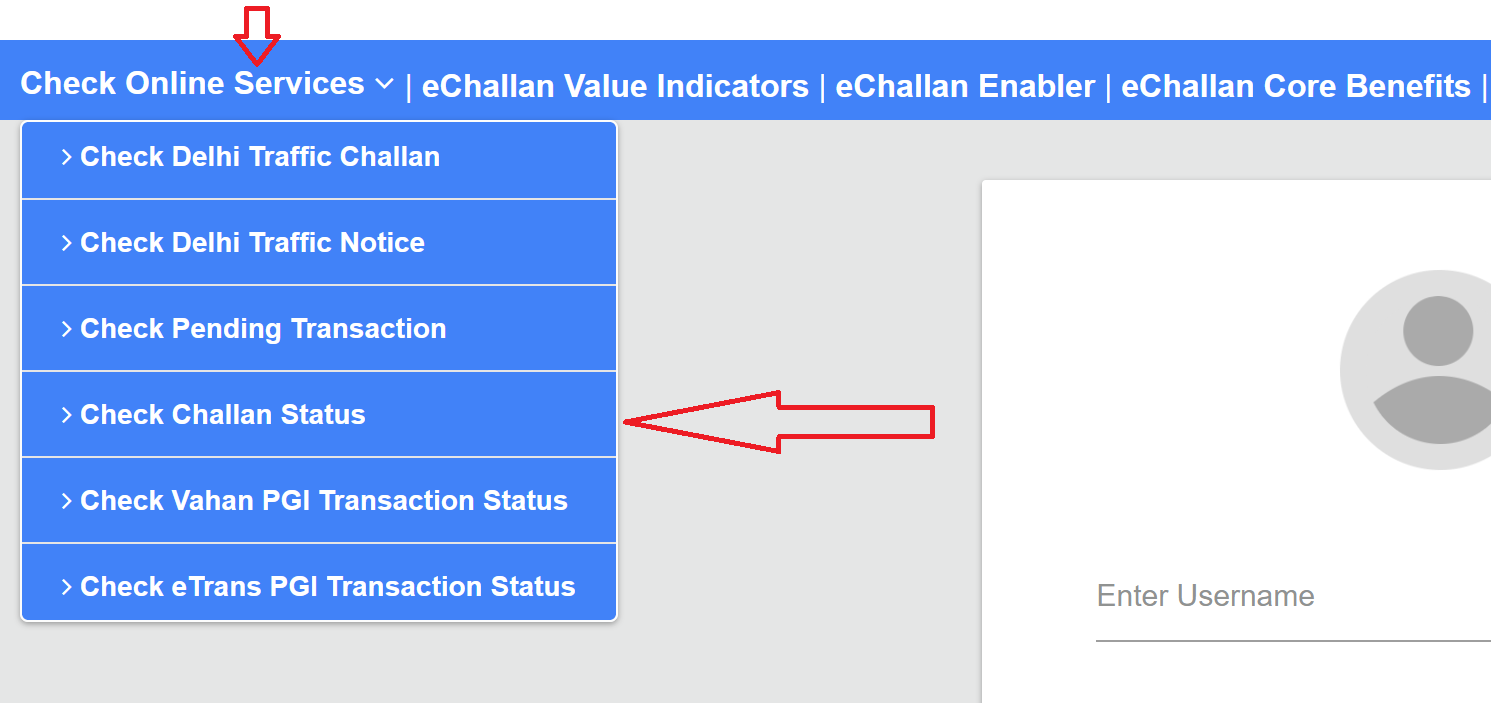
- Click on Check Challan Status under the "Check Online Services" section.
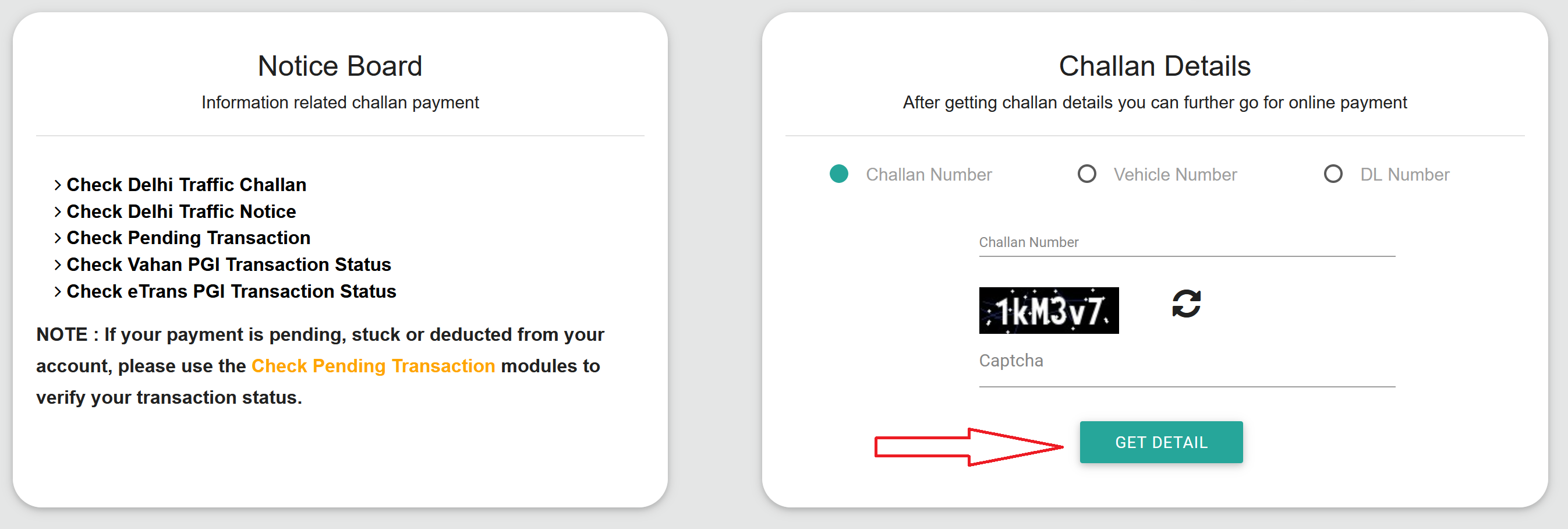
- You'll see three tabs: Challan Number, Vehicle Number, and DL Number. Pick whichever you have.
- Enter the details. If using vehicle number, type it without spaces (e.g., DL5CA1234). For DL number, enter the full licence number.
- Enter the captcha code shown on screen.
- Click Get Detail.
If there are any challans, the portal will show you the full list with:
- Violation type (e.g., overspeeding, no helmet)
- Fine amount
- Date and time of the violation
- Location
- Issuing authority
- Payment status (pending or paid)
If there are no pending challans, it'll say so. Either way, it takes just a minute to check.
On the mParivahan App
- Download the mParivahan app (available on Google Play Store and Apple App Store).
- Open it, register with your mobile number, and add your vehicle.
- The app shows any pending challans linked to your vehicle along with the details. You can also pay directly from the app.
On State-Specific Portals
Some states have their own traffic police portals where you can check challans. For example, Delhi has - traffic.delhipolice.gov.in/notice/pay-notice/, and Karnataka has karnatakaone.gov.in. The process is similar: enter your vehicle number or challan number and view the details. If your state has its own portal, it may show challans that haven't yet synced to the national portal.
How to Pay eChallan Online
Once you've checked and found a pending challan, paying it is straightforward.
On the Parivahan Portal
- Go to echallan.parivahan.gov.in.
- Click on Check Challan Status and enter your vehicle number, challan number, or DL number.
- Click Get Detail to see your pending challans.
- An OTP will be sent to the mobile number registered with the vehicle. Enter the OTP to verify.
- Select the challan you want to pay.
- Click Pay Now.
- Choose your payment method: UPI, net banking, debit card, or credit card.
- Complete the payment.
- Download or screenshot the payment receipt. You'll also get a confirmation SMS.
Through UPI Apps
Some states allow you to pay challans directly through apps like Google Pay, PhonePe, or Paytm. Search for "traffic challan" or "eChallan" within the app, enter your vehicle number, and proceed to pay if any pending fines show up.
Offline Payment
If online payment isn't working for you or you prefer paying in person:
- Visit your nearest traffic police station or RTO office.
- Carry the challan SMS or a printout showing the challan number and vehicle details.
- Pay the fine via cash, card, or UPI (wherever accepted).
- Collect a physical receipt and keep it safe.
Online payment is faster and gives you instant digital confirmation, but offline works just fine if needed.
Payment Deadline
You have 60 days from the date a challan is issued to pay the fine. This isn't a suggestion, it's a legal deadline. If you don't pay within 60 days, things can escalate:
- Court summons. The challan gets forwarded to a traffic court, and you may receive a notice to appear. Ignoring the court notice makes things worse.
- Additional penalties. The fine amount can increase once it goes to court. You may end up paying significantly more than the original challan.
- Licence suspension. For serious violations like drunk driving, repeated offences, or dangerous driving, non-payment can lead to your driving licence being suspended or even cancelled.
- Vehicle blacklisting. In some states, vehicles with multiple unpaid challans can be flagged during RC renewal or fitness checks.
The bottom line: just pay it. If you think the challan is wrong, there's a separate process to contest it (covered below), but ignoring it is not the way to handle it.
Traffic Violations and Fines in India
These penalties are based on the Motor Vehicles (Amendment) Act, 2019, with the revised fines that took effect from March 1, 2025. The central government sets maximum penalties, but actual amounts may vary by state since enforcement is managed by state traffic departments.
| Violation | Penalty |
|---|---|
| General traffic rule violation | ₹500 to ₹1,000 |
| Driving without a valid licence | ₹5,000 |
| Driving without insurance | ₹2,000 and/or 3 months imprisonment |
| Overspeeding | ₹1,000 to ₹5,000 (varies by vehicle type) |
| Jumping red light / signal | ₹1,000 to ₹5,000 |
| Riding without helmet (two-wheeler) | ₹1,000 and 3-month licence suspension |
| Driving without seatbelt | ₹1,000 |
| Using mobile phone while driving | ₹5,000 |
| Drunk driving | ₹10,000 and/or 6 months imprisonment (first offence); ₹15,000 and/or 2 years (repeat) |
| Dangerous/rash driving | ₹5,000 and/or 6 months to 1 year imprisonment |
| Driving without PUC certificate | ₹10,000 |
| Not giving way to emergency vehicles | ₹10,000 |
| Driving without registration | ₹5,000 |
| Overloading (passengers) | ₹1,000 per extra passenger |
| Juvenile driving (underage) | ₹25,000 fine on guardian + 3 years imprisonment for guardian; vehicle registration cancelled |
| Racing on public roads | ₹5,000 |
| Not wearing rear seatbelt | ₹1,000 |
Got a Wrong Challan? Here's How to Contest It
This happens more often than you'd expect. A CCTV camera misreads a number plate, a system glitch assigns someone else's violation to your vehicle, or a duplicate challan gets generated for the same offence. If you've received a challan for something you didn't do, you have the right to contest it.
How to Raise a Dispute Online
- Go to echallan.parivahan.gov.in.
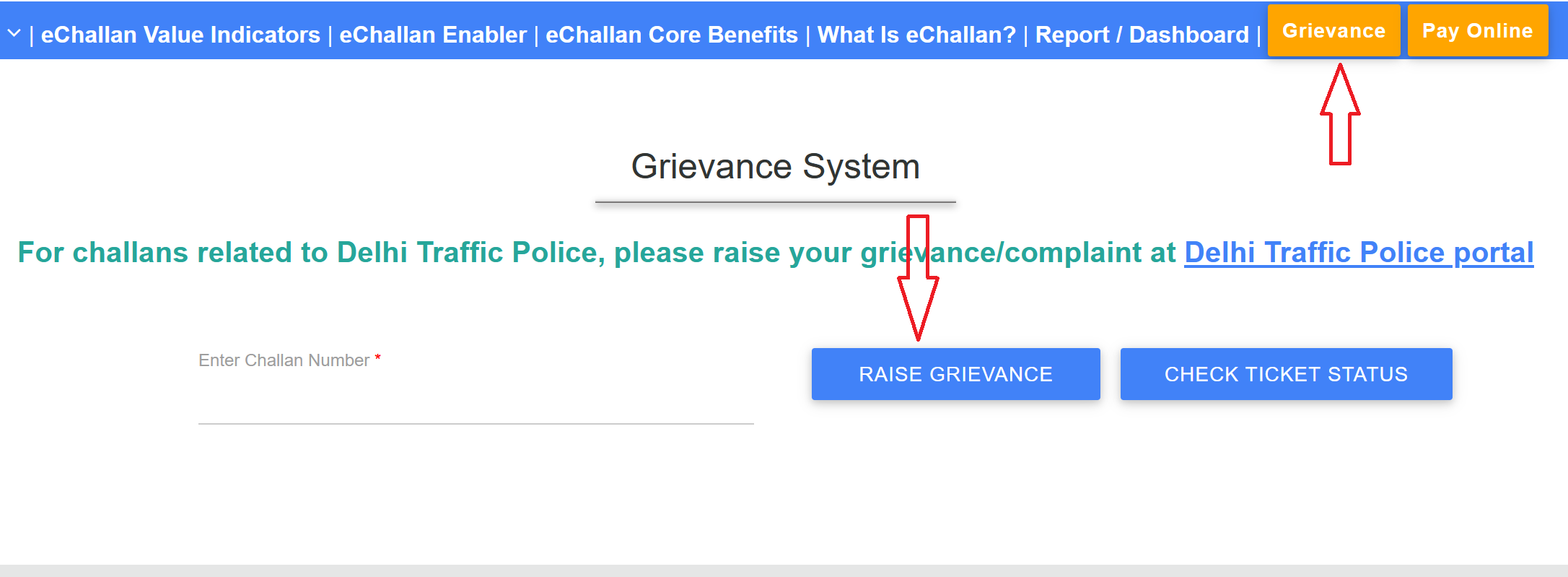
- Click on the Grievance tab on the top menu. This takes you to the Grievance System page.
- Enter the challan number and click Raise Grievance.
- Verify yourself through mobile number OTP or Aadhaar OTP.
- Once verified, select the reason for dispute from the dropdown menu. Options include things like wrong vehicle number, incorrect violation, duplicate challan, vehicle was not at the location, etc.
- Write a brief explanation of why you believe the challan is wrong.
- Upload supporting evidence if you have any: photos, videos, GPS records, dashcam footage, toll receipts, or anything that proves your vehicle wasn't at the location or the violation didn't happen.
- Click Submit.
After submission, you'll receive a complaint number (e-ticket number). Save it.
If Your Complaint Gets Rejected
If the grievance system rejects your dispute and you still believe the challan is wrong:
- Email helpdesk-echallan@gov.in with a detailed explanation and all supporting evidence attached.
- Visit your nearest traffic police station or RTO in person with the documents.
- As a last resort, you can contest the challan in the traffic court mentioned on the challan or through Lok Adalat (which many states organize periodically for traffic challan settlements).
Filing a wrong challan complaint is free of charge. There's no fee involved.
Watch Out for eChallan Scams
This is becoming a serious problem. Scammers send fake SMS messages that look like real eChallan notifications, complete with a link to a fake payment website. If you enter your payment details there, your money goes to the scammer, not the government.
Here's how to stay safe:
- Never click on links in SMS messages claiming to be eChallan notifications. The real eChallan system doesn't usually include payment links in SMS. If you get a message saying you have a challan, go to echallan.parivahan.gov.in directly in your browser and check.
- Check the URL carefully. The only official eChallan portal is echallan.parivahan.gov.in. Anything else, even if it looks similar, is fake.
- Never share OTP, card details, or passwords with anyone calling or messaging about a challan. No government official will ask for these.
Documents You Should Always Carry While Driving
Since eChallan violations often relate to missing or expired documents, it's worth noting what you're legally required to carry:
- Driving Licence (physical card or digital copy on DigiLocker/mParivahan)
- Vehicle Registration Certificate (RC) (physical or digital)
- Vehicle Insurance (must be valid and current)
- PUC Certificate (Pollution Under Control, must be valid)
eChallan Helpdesk
If you're facing issues with the portal, payment failures, or need help with a dispute:
- Email: helpdesk-echallan@gov.in
- Phone: 0120-2459171 (available 6 AM to 10 PM, all days)
Important Notes
- Pay within 60 days. After that, it goes to court and gets more expensive.
- Check regularly. CCTV-based challans can show up without you even knowing you were caught. Make it a habit to check your vehicle number on the portal every month or so.
- Save your receipts. After paying, download the receipt or screenshot the confirmation. Payment status sometimes takes a few hours to update on the portal.
- Digital DL and RC are valid. If you get stopped and don't have physical documents, showing them on DigiLocker or mParivahan is legally accepted.
- One challan can affect RC renewal. Some states don't let you renew your RC or vehicle fitness if there are unpaid challans. Clear them before going for any vehicle-related service.
- State fines may differ. The Motor Vehicles Act sets maximum penalties, but some states charge less for certain violations. The amount shown on your specific challan is what you owe.